


Security Essentials,once codenamed "Morro" is the company's replacement for Windows Live OneCare.It consumes less memory and disk space than commercial security suites.It is simple to install, easy to use, and always kept up to date so you can be assured your PC is protected by the latest technology. It’s easy to tell if your PC is secure — when you’re green, you’re good. It’s that simple. Microsoft Security Essentials runs quietly and efficiently in the background so that you are free to use your Windows-based PC the way you want—without interruptions or long computer wait times.
Microsoft Security Essentials is available for Windows XP 32-bit (8.61MB), Windows Vista/7 32-bit (4.28MB), and Windows Vista/7 64-bit (4.71MB).
Also Read
Many of us experience situations where software cannot be removed using the standard remove programs module in windows.This may due to uninstaller not found or some other reason like corruption of registry entries.The uninstallation simply stops or does not start at all leaving the user puzzled and confused.
Here is the free program called ARP++ which will allow you to uninstall programs which cannot be removed from or may not even appear in the Windows Add Remove Programs.And still more programs may not even appear. ARP++ displays all known programs on your system that can be uninstalled through conventional means.


Automatic, Manual, and Disabled are the three startup settings for Windows Services.In windows many nonessential services are setting by default to start automatically.However, some of them won't be of any use for you. By quitting those unused services, you can realize higher system performances.When services are stopped, they don't use memory.A bigger impact is found in available RAM
To see the services that are on your computer go to Start|Run and enter “services.msc”.This will open what is called the “services console.” You can disable or enable the services according to your needs, but you have to edit each service one by one.This takes a lot of time and a lot of effort.


Here an online utility from ServicesEditor.com allows the users to quickly run down a list, choose what action they want for the service and then download a quick and easy registry file which updates their PC's .You can download the registry file after enabling or disabling services.This facility is available for Windows XP,Vista and Windows 7.

Right click on the reg file and choose "merge to execute the file.You should be asked something like: "Are you sure you want to add the information in.reg to the registry?" Click "OK" .In another way by Start> Run>Type in regedit, and then press OK .In regedit, click on File, and then Import .Locate the ".reg" file you want to enter, and press OK .The contents of that ".reg" file will be entered into the registry. Reboot your PC.
Visit http://serviceseditor.com/ [Via]
If you are a Windows user, you may have experienced with BSOD- the famous Windows Stop Error or 'Blue Screen of Death.’Blue Screen of death can happen for many reasons but here are some common ones
- Software errors during Windows operation
- Hardware errors during Windows operation
- Installation errors
- Startup errors
- Intermittent errors
A small memory dump file records the smallest set of useful information that may help identify why your computer has stopped unexpectedly.These minidump (*.dmp) files are usually found in C:\Windows\Minidump .Sometimes the problem solved with simple reboot.But many occasions it is not so.

BlueScreenView is a portable application that will scan all your minidump files and then display the information about all crashes in one table.BSV doesn't require installation .With this you'll be able to see the exact programs and dlls involved in the crash
Features
- Automatically scans your current minidump folder and displays the list of all crash dumps, including crash dump date/time and crash details.
- Allows you to view a blue screen which is very similar to the one the Windows displayed during the crash.
- BlueScreenView enumerates the memory addresses inside the stack of the crash, and find all drivers/modules that might be involved in the crash.
- BlueScreenView also allows you to work with another instance of Windows, simply by choosing the right minidump folder (In Advanced Options).
- BlueScreenView automatically locate the drivers appeared in the crash dump, and extract their version resource information, including product name, file version, company, and file description.


Also read How to use Dumpchk.exe to check a memory dump file: http://support.microsoft.com/kb/156280/ | http://support.microsoft.com/kb/315271/ | Debugging Tools for Windows
Do you have a Windows PC that seems much slower than it once was?Think of all of the things you do when you are online. You may download files, share networks, put more things on your hard drive. Some software files may be huge. Then after time, when we no longer use these applications, we still leave them setting there, taking up space. Unwanted entries are also accumulates in registry.All these leads to the slowing down of PC.
If you are looking for complete computer maintenance software then try Glary Utilities .Glary Utilities is a freeware with registry and disk cleaning, privacy protection, performance accelerator and amazing multifunctional tools. It can fix dogged registry errors, wipe off clutters, optimize internet speed, safeguard confidential files and maintain maximum performance.This powerful application offers extensive utilities to improve your system's performance and protect your privacy.


You can clean common system junk files, invalid registry entries and Internet traces with Glary Utilities. You can also manage and delete browser add-ons, analyze disk space usage and find duplicate files,view and manage installed shell extensions, encrypt your files from unauthorized access and use, split large files into smaller manageable files and then rejoin them. It includes the options to optimize memory, find, fix, or remove broken Windows shortcuts, manage the programs that start at Windows startup and uninstall software. Other features include secure file deletion, an Empty Folder finder and more
- Optimize, clean and boost the speed of your Windows.
- Protect your privacy and security.
- Block spyware, trojans, adware, etc.
- Fix certain application errors.
- Simple, fast and User friendly interface

The notifications received from Orkut updates and other messages are received either through mail or as Orkut messages. Sometimes these messages may seem unsolicited and irritating. In such times there arises a need to either block them or control them. It all depends on what you finally decide to settle for. Here’s how to do it:
- Log into your Orkut account.
- Click on ‘Settings’ in the right bar.
- Click the “Notifications” tab.
- Select and deselect the notifications that you would like to receive and also how you would like to receive them.
- Click ’Edit’ to select preferences of each of the updates.

This will help you do away with all the unnecessary mails that you receive every time someone scraps you or adds you on Orkut.
You can adjust the look of the characters horizontally in your document. Word enables you to adjust the appearance of your text without affecting the height. This can be done using the scaling feature available in Word. Scaling can be applied to any character in the selection.Here is what you need to do.
- Select the characters to be scaled.
- Click ‘Format | Font’.
- In the dialogue box click the ‘Character Spacing’ tab.
- Select the required scaling value to be applied to the characters from the drop-down list.
- Enter any value between 1% to 600% in the drop-down box, finally click ‘OK’.

If you scale the characters in your document on a regular basis, add a scaling tool to the Quick Access toolbar for ease.Here’s how you can do it:
- Click ‘Office’.
- Now click ‘Word Options’.
- From the left, click ‘Customize’
- Now, choose ‘All Commands’
- Select ‘Character Scaling’
- Click once to select the command.
- Click ‘Add’
- Click ‘OK’ to save the changes.

You can view the command on the Quick Access tool bar appearing on the top of the Word 2007 window.
Windows Vista Ultimate has an amazing graphical interface like you’ve never seen before. An arrow appears on every shortcut that is placed on the desktop or anywhere on the computer.This can be annoying and you may want to remove them. All you need to do
is edit the registry. Follow the steps listed below to do so:
- Click ‘Start’ and type ‘regedit’
- Expand on folder named the‘HKEY_CLASSES_ROOT’.
- Click the ‘Inkfile’ folder.
- Type ‘AriochIsShortcut’ instead of ‘IsShortcut’
- Once done close regedit and reboot.
- The arrows no longer appear on the shortcut icons.
- To reverse the process, replace ‘IsShortcut’ with ‘AriochIsShortcut’ and reboot the system.
Many of us have been using msconfig to get rid of unwanted startup programs .It has worked using the startup tab to disable programs until recently . Even though you are logged as a user that has admin privilege ,suddenly when you start the program you may get 'an access denied error was returned while attempting to change a service. You may need to log on using an Administrator account to make the specified changes'

Try the following methods to remove this access denied error.
1.This may be due to a malware infection.You can remove certain restrictions on XP systems often disabled by malware by using RatsCheddar.It is a Policy Controller program written by Rathat
- Download and save RatsCheddar.zip to your desktop.
- Extract the file to the desktop by using WinZip / 7Zip.
- Launch the tool. by Double-click on RatsCheddar.exe.
- Select Enable for everything listed, then click Exit.
- Restart your computer

2.FixPolicies utility from Bill Castner:
- Download FixPolicies by Bill Castner and save to your desktop
- Run the FixPolicies.exe..
- Click on Install. It will create a folder named FixPolicies on your desktop.
- Open the FixPolicies folder.
- Double click on Fix_policies.cmd to run it. Command Prompt will open and close quickly.
3.If you have or share HP printers, especially the HP PSC 2100, 2200, 4100 and 6100 series, you may receive this error.The culprit is a security update for the HP printer software.PML Security Update pmsvptch.exe causes a service "PML Driver HPZ12" to start in services.msc which would interfere with the rights/privileges.
The HP printer software may load a service named PML Driver HPZ12, which is added to the services section of msconfig. This service handles many functions pertaining to the communication between the computer and the printer. However, many of these functions are not related to printing, so you can fix the “Access Denied” error by disabling the service.
1. Srart>Run> regedit
2. Export registry to make a backup (as a precaution)
3. Open HKEY_LOCAL_MACHINE/SYSTEM/CurrentControlSet/Services/PmlDriver HPZ12/Start
4. Right Click and select modify
5. Change value to 3 for manual (or 4 for disabled )
6.Restart computer

As an alternative , try Startup Control Panel , which is a nifty control panel applet that allows you to easily configure which programs run when your computer starts.Download Startup Control Panel 2.8 and you can stop items from starting up.
Every year social Networking sites are growing by double digits . Many of us are members of these sites. And such sites offer a great opportunity for Helpers to let their friends, family, and customers know about the technical services they provide. CrossLoop is a must-have tool for anyone who serves as the go-to tech support guru for friends and family.This free program can be used to fix computer problems remotely.
Just install the CrossLoop application on your PC, then have the person on the other PC do the same. Interface is simple , that allows you to start a sharing session with a friend who also has Crossloop installed.After installation, your PC will be assigned a 12-digit access code each time you start the program.The program uses 128-bit encryption .You 


The add-on lets users comment on the website and also allows users to search and 

Features
- View tweets about any webpage
- Join the discussion, reply, retweet
- View the popular pages on a website
- Doubles up as a full blown twitter client allowing you to update, view @mentions and DM as well as new followers and unfollowers
- Supports Firefox, Internet Explorer


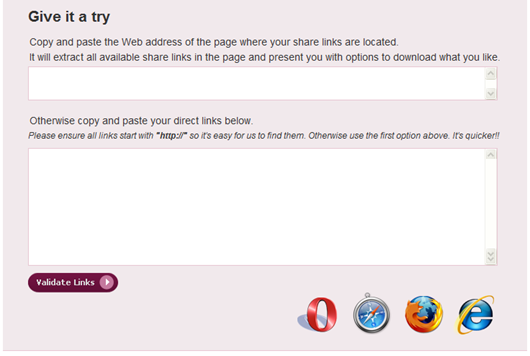
Many of us rely on file downloading links like RapidShare ,Megaupload, FileFactory etc .Here is a website enabling the user to quickly and easily open multiple links with just
If you have an account with Rapidshare, Megaupload, FileFactory or any other file hosting provider, it will enable you to quickly and easily open multiple links with just one click.You simply paste in a URL or a text containing links and it will analyze the data to present you with a quick and easy way to select what you like to download.

The width of the buttons of running programs in the taskbar is restricted.You may noticed that even if only one program is open, its complete name is not visible .In such cases,you would like the button in the taskbar to be bigger.When several symbols have to share the space in the taskbar ,Windows automatically reduces the size of the individual objects.With enough space however ,a specific minimum value is used for these icons.With that, you can modify the size of the button in the registry.
For that , click Start>Run>type “Regedit” without quotes ,and click ”OK”.Navigate to
HKEY_CURRENT_USER\ControlPanel\Desktop\WindowMetrics
Search for the character string ‘MinWidth’ towards the right of the window.(If the entry does not exist ,create it the with the command ‘Edit| New | Character String’ ).To edit ,double-click on the new entry.In the following dialog ,enter the desired minimum size in pixels.

Don’t worry about the minimum size , because Windows always reduces the actual size to the suitable size of the free space in the taskbar.The set of value is used only if the free space is more than or equal this value.For example enter ‘1000’ and confirm with ‘OK’.

Before

After
You may have noticed after rebooting your PC seems to run better.Why your machine runs much faster right after you reboot? Most of the time it's due to resources not being properly freed, and which couldn't be easily reclaimed without rebooting .AnalogX MaxMem is a real-time physical memory management program which automatically ensures that you always have as much physical memory available as possible.

It does this by allowing you to set minimum amounts of memory to be made available under certain circumstance, and then passively monitoring how much system resources are being used. It runs in the system tray, and also shows you exactly how much memory you have available.It also graphs how you've been using memory over the last 60 seconds.MaxMem works on all versions of Windows, from Window 95 to Windows 7 and everything in-between (including XP, Vista, Win2k, etc)

GMDesk is an Adobe AIR application that provides quick access to Google services in a standalone window separate from your browser.There is no need to open it up in a web
The advantage of using GMDesk is that you don't have to open your web browser, load the website of each one of those services, login with your username and password and then wait for it to load.GMD doesn’t change or add to the features of these applications or not faster than your browser, but it makes the whole process just easier.

It offers an easy menu as well as keyboard shortcuts to switch between different Google services, and you can specify what default service you want the application to start with.

Adobe AIR (15.1MB) |Homepage
Keylogger is small spy program or hardware device , that has the ability record everything you type on the computer.It either stores this information in a hidden place on your computer or sends it over the Internet to the person who infiltrated it.
Keyloggers can be used to monitor employee's activity or watch your computer while you are away. But some people abuse the program to steal others' passwords.They can violate user privacy for months and even years until the user will notice them. During al

Keyloggers can come in many forms, as emails, viruses, Trojan horses; from people who might try to invade your privacy .Most of them are invisible, so you won't know if they are running on your system.How can you know if such program has been installed on your computer?How can you protect your privacy?
Hardware Keylogger
1.Check the Windows Task Manager for all running tasks by hitting Control + Alt + Delete. You can verify all the tasks and research unknown tasks by Google Search.
2.Start >> Run >> type msconfig >> hit enter>> Start tab >> Verify all programs that are set to start up each time you boot the computer. Compare the programs listed and learn more about them on the internet to see whether they are legitimate startup programs or possible keyloggers
3.Check the cable connections of the keyboard and make sure there are not "extra connectors" on the end of it. The keyboard should have a single cable with no removable bit on the end and it should plug directly into a port on the back of the computer box. Hardware keylogger.
4.Check the services running in your PC.Start > Run >type services.msc.Check those items running automatically.If anything found suspicious stop those.
5. You would fist look in the add/remove programs to see if anything has been installed that can monitor keystrokes.
I recommend setting new passwords (good strong passwords are at least 8 characters long and use a combination of UPPERCASE, lowercase, numb3rs, and speci@l ch@racters) on all programs .
Softwares to detect keyloggers:Spyware protection software or keylogger remover is the easiest way to remove spyware and keeping it away. It detects and removes all pieces of spyware and adware automatically. Spyware is extremely difficult to remove manually and should only be removed with effective and advanced keylogger or spyware protection software. Protect your computer from these malicious spywares and enjoy peace of mind.
Are you sure that your security software is capable of identifying keylogging activities? Here is a simple test software available from Zemana, which lets you simulate a keylogger on your computer. It is a free download which can run it on your computer. If your security software is able to detect it, then you may be confident about the effectiveness of that against keyloggers, otherwise it is time to have a second look at your choice of security software. Check :http://www.zemana.com/KeyLogger_Test.aspx
Yahoo! took the world by storm in the 1990s as a one-of-a-kind, searchable list of interesting web sites. But ten years later, it has expanded into a department store overflowing with useful and innovative tools and services-from email, blogging, social networking, and instant messaging, to news, financial markets, shopping, movie and TV listings, and much more. Today's Yahoo! keeps you connected with every aspect of your life and every corner of the Web. Yahoo! Hacks shows you how to use, expand, personalize, and tweak Yahoo! in ways you never dreamed possible. You'll learn how to: Fine-tune search queries with keyword shortcuts and advanced syntax Manage and customize Yahoo! Mail, using it as your universal email client to access all your other accounts Explore your social networks with Yahoo! 360, blogging your life, keeping up with friends, and making new contacts Store, sort, blog, feed, track, and otherwise share photos with Flickr and RSS Make My Yahoo! your Yahoo!, and personalize Yahoo!'s many properties Roll your own Yahoo! applications with Yahoo! new Web Services API and Perl, PHP, Java, Python, Ruby, or the programming language of your choice Visualize search results and topics, mash up images from around the Web, and remix other web content List (or hide) your site with Yahoo!, and integrate Yahoo! Groups, Messenger, contextual search ,or other Yahoo! features Whether you want to become a power searcher, news monger, super shopper, or innovative web developer, Yahoo! Hacks provides the tools to take you further than you ever thought possible.


When you press Start > Search on your Windows XP computer, you receive an error:

After you receive this error message, you cannot use Search Companion to search for files or folders, or to search the Internet. The options to search for files or folders, or to search the Internet, are unavailable.This behavior can occur if a file required to run Search Companion is missing or damaged.
Log on to the computer by using an account with administrator permissions.
1. Start>Run>%SystemRoot%\Inf>folder.
2. Locate the srchasst.inf file
3. Right-click the Srchasst.inf file and press Install.
4. If you are prompted for the location of msgr3en.dll .You'll need your XP CD or, if you have Service pack installed then extract the files from the Windows\ServicePackFiles\i386 folder.Type C:\Windows\i386 into the Copy Files From dialog and press OK.

Also check: http://support.microsoft.com/kb/319949


