


More details here :http://www.adobe.com/support/security/bulletins/apsb10-02.html
Are you annoyed with Adobe auto-updater which is popping up and freezing the applications?You can completely disable the feature in the latest version of Adobe Acrobat reader 8.1, just follow the steps below to disable Adobe updater


You need to uncheck “Automatically check for Adobe update” & “Choose the applications to update”

Another way to disable automatic updation : Run the following command from a Command Prompt. This will require admin access to the machine you are running this on, so if you are running Windows Vista you must use an elevated command prompt.
REG ADD "HKLM\SOFTWARE\Policies\Adobe\Acrobat Reader\8.0\FeatureLockdown" /v bUpdater /d 0 /t REG_DWORD /f

Adobe launched its latest version Acrobat 9


Overall, Adobe Reader provides users with the ability to view PDF files efficiently, with an interface and tools to make viewing both simple and painless. Though there are other PDF readers available that may take up less space or work at slightly faster speeds, none offer as much of a toolset as Adobe Reader does nor seamless integration with other useful Adobe tools.

SysReq:Windows 2000/XP/Vista | Download |Freeware | 33.5MB |Buzzword |Acrobat.com
Adobe reader is the most popular freeware to open .PDF files.The problem with Adobe Reader is it takes up lot of memory and slow to open.Adobe Reader Speed-Up significantly decreases the amount of time required for Adobe Reader to start by disabling most of the least used plugins.
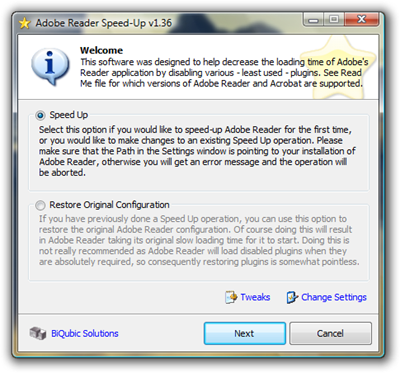
This software supports the speed-up of the following:
- Adobe Acrobat 3.0
- Adobe Acrobat 4.0
- Adobe Acrobat 4.0.5
- Adobe Acrobat 5.0
- Adobe Acrobat 5.1
- Adobe Acrobat 5.5
- Adobe Acrobat/Reader 6.0
- Adobe Acrobat/Reader 6.0.1
- Adobe Acrobat/Reader 6.0.2
- Adobe Acrobat/Reader 7.0.0 / 7.0.1 / 7.0.2 / 7.0.3
- Adobe Acrobat/Reader 7.0.4 / 7.0.5 / 7.0.6 / 7.0.7
- Adobe Acrobat/Reader 7.0.8
- Adobe Acrobat/Reader 8.0.0
 Download Sys Req: VB Runtime


