

Hiren's BootCD (HBCD) is a bootable CD that contains a load of useful tools such as partitioning agents, system performance benchmarks, disk cloning and imaging tools, data recovery tools, MBR tools, BIOS tools, and many others for fixing various computer problems.
It is a great resource for anyone with computer problems who is having trouble accessing the internet to download programs in an attempt to fix it.At one bootable CD contains dozens of the most popular programs and utilities for running DOS. These are utilities for working with hard drive, its recovery and diagnostic utility of diagnosis of all sites in a computer, file managers, utilities for the network,partitioning tools, backup, recovery and BIOS/CMOS tools as well as many others. Hiren's BootCD eliminates the need to keep on hand dozens and dozens of options in what they can do.Competently and professionally assembled, the most popular boot disk, literally everyone, including administrators and administrators for repair work on the computer.

Homepage - http://www.hiren.info/pages/bootcd
HotFile: Part 1 | Part 2 DepositFiles: Part 1 | Part 2 Rapidshare: Part 1 | Part 2
Even though you stored CDs/DVDs properly which might unreadable over time due to the scratches.Abyssal Recovery is a free tool that helps you recover corrupt data on scratched CDs and DVDs that have become partially illegible.It can copy the files to another destination on your hard drive.This tool allow you to copy data byte by byte which actually give you maximum data recovering ability. In addition to this it wont hang your system . Abyssal Recovery will skip the bytes which are not readable from file and copy all other bytes to extract maximum data. You can set the program to copy byte with byte to minimize the losses, or you can set a higher number of bytes to be copied once for a faster recovery.You can set a higher number of bytes to be copied once for a faster recovery(not recommended).

You can also use this tool to recover deleted files from your hard disk. To recover files and data, open the application and select the drive you want to do recovery.
Download | 724 KB|Freeware|Windows XP/2003/Vista/2008/7
Also Read:How To Recover Files From Corrupted/Scratched CD/DVD
CD’s and DVD’s are the media , which can keep the data for a limited period of time (normally many years). After that time, data loss develops slowly with read errors growing from the outer media region towards the inside.But that will gradually degrade and the the information stored within them can become unreadable. You might have got errors such as “ Cannot read from the source file or disk” .Ultimately we may lose our valuable information.

There is a way to Protect DVD, CD medias from future damages. We can still recover the data stored in them very easily. Dvdisaster - an open source tool of security that creates a file error correction prevent any loss of information in an optical storage device, either a CD or DVD. It tries to read as much data as possible from defective media. Afterwards unreadable sectors are recovered using the previously created error correction code. The maximum error correction capacity is user-selectable. If you create the error correction code file in time and keep it at a safe place, you have a good chance of recovering the medium contents from typical read errors and to transfer your complete data onto a new medium.

Features
Download Dvdisaster
Also Read : How To Recover Files From Corrupted/Scratched CD/DVD
Sometimes when you try to access the CD/DVD drive , you might face this error "CD/DVD is missing".Sometimes drives not recognized by Windows or other programs.Rizone CD-DVD Repair is a small utility that will repair Windows if your CD or DVD drive is missing or not recognized by Windows or other programs. Apart form the basic functionality it also allows resetting of Autorun settings and protection against Autorun parasites.


RescueCd is a Linux system rescue disk available as a handy bootable CD-ROM for administrating or repairing your system and data after a crash due to a virus attack.It is very useful in case the computer gets infected.
Avira AntiVir Rescue System is another useful utlity that allows accessing computers that cannot be booted anymore. Thus it is possible to:
- repair a damaged system
- rescue data
- scan the system for virus infections

Just double-click on the rescue system package to burn it to a CD/DVD. You can then use this CD/DVD to boot your computer.It gives the user three options on how to handle the situation. You can try to repair a damaged system, rescue data and scan the system for virus infections.


Burning data to optical discs, for instance a CD, is the most popular method of backing up data, due to its low cost and easy portability. If you do use them regularly they tend to become scratches and it happens that sectors on the disk fail and can’t be read anymore.
IsoPuzzle will help you just incase the computer refuses to read the documents, pictures or films on the CD or DVD. The tool takes a snapshot of all the data which it can still retrieve, and writes it to a new ISO file. Burn this image onto a blank CD, and the data can be read again.

For more Info about IsoPuzzle click here
The Unstoppable Copier another tool is somewhat faster, but its downside is that it is not very thorough It can even copy files from a scratched CD if Windows deletes or aborts the process. Moreover, the interface is intuitive. Select the drive as the source, click on the target folder, then ‘Copy’ and keep your fingers crossed, so that the software retrieves all your data.

CD Recovery Toolbox - CD Recovery Toolbox was developed for recovering damaged files from different disk types: CD, DVD, HD DVD, Blu-Ray, etc. Use it to restore and recover information lost as a consequence of some mechanical damage of the disk such as surface scratches, chips, different spots on the surface or as a result of incorrect recording on the boot sector. Thus, the program can recover data from CD and DVD that was considered lost or unreadable by the DVD drive. This is another good damaged DVD data recovery tool

Features
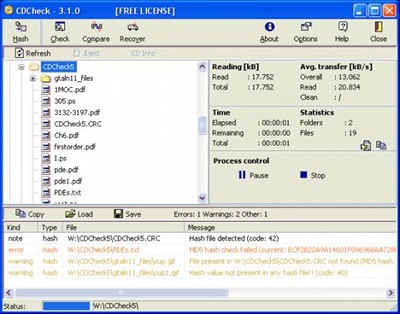
CD Check - Yet another DVD data recovery, CDCheck is a utility for the prevention, detection and recovery of damaged files on CD-ROMs with an emphasis on error detection. With CDCheck you can check your CDs and discover which files are corrupted that might affect the readability of the disk. Prevention is better than cure.

Recover Disc is an easy-to-use program(Commercial Software) that helps you extract data from scratched, damaged, defective or incorrectly burned CD and DVD discs when regular software can't read them fully or partially. This tool extracts the intact portion of your data and tries to recover problem areas. You can either choose to recover selected files, or save an image of the whole disc.

Download the 30-day trial version
IsoBuster is another commercial software highly specialized and easy to use CD, DVD and blu-ray (BD, HD DVD) data recovery tool.It supports all CD / DVD / BD / HD DVD formats and all common file-systems . Rescue lost files from a bad or trashed CD or DVD disc, save important documents, precious pictures, video from the family.

Download your trail version
Power CD DVD Recovery is an easy-to-use, windows based application designed specifically to recover lost and deleted files from damaged, scratched or defective CD and DVD discs. This program can recover files recorded by common CD/DVD writing software. It supports data recovery from all CD and DVD disc types (CD-ROM, CD-R, CD-RW, DVD-ROM, DVD-R, and DVD-RW), and from quick formatted RW discs. It also supports disc recorded with UDF packet writing software: DirectCD, InCD, packetCD. The recovery wizard allows you to easily scan and recover files

Download your trail version
General Tips:
* Always wipe the CD from the center outward with stratight spoke-like strokes. Wiping CDs in circles will create more scratches.
* Do not scratch the graphics layer as you cannot repair the disc.
HINT: Hold the disc up to a light with the graphics layer facing the light source. If you can see light thru the scratches at any point then the disc may be irreparable and or exhibit loading or playing errors.
* Clean your Disc players lens regularly with a suitable product to ensure optimal viewing pleasure.
* Make sure to use a soft, lint-free cloth to clean both sides of the disc. Wipe in a straight line from the centre of the disc to the outer edge.
* If wiping with a cloth does not remove a fingerprint or smudge, use a specialized DVD disc polishing spray to clean the disc.
* Only handle the disc by its outer edge and the empty hole in the middle. This will help prevent fingerprints, smudges or scratches
Dirt spots and small scratches can quickly destroy the surface of disks. This tool reads all sectors of the Data and stores them in an ISO file so that you can return them to CD / DVD.
IsoPuzzle is a freeware that helps save important data from damaged ,bad burned or scratched discs.All good sectors, that are those that can be read without errors, are written correctly and flagged as good while bad sectors will be flagged as bad.

This version supports only data CDs and DVDs with sector size of 2048 byte - Audio CD, VCD and SVCD are not supported.For using different drives you can share the image file *.ISO (together with the flag file *.FLG) on a network drive or put it on a portable disk (USB).


In normal circumstances, a badly scratched disc might show up as completely unreadable by your computer.CD Recovery Toolbox Free is a data recovery tool, designed to recover files from scratched or otherwise damaged or corrupt CD, DVD, HD DVD and Blu-Ray disks.You can use it to restore information lost as a result of some mechanical damage of the disk (scratches, chips, different spots on the surface) or as a result of incorrect recording.
Not all of the files and folders can be found - that depends on the degree and location of the damage. Therefore, the CD Recovery Toolbox Free tool finds the possible maximum amount of information. After that, it shows a list of all files and folders available for recovery. Now the user can select the files and folders to be recovered. Those specific objects will be recovered while the others will be ignored. The program recovers the maximum amount of information in the damaged file. This reduces the risk of data loss considerably

Features:
- Recovering files larger than 4 Gb
- Detecting possible lack of free space on the hard disk for storing the recovered files
- Recovering corrupted data from all most common types of media for today
- Working with data that became corrupted both after a physical damage of the media and due to program errors
- Allowing the user to completely control the recovery process
- Giving the user as detailed report about the data recovery process as possible
SysReq:Windows 98, Me, NT 4.0, 2000, XP, 2003, Vista|Freeware|662KB
![download_thumb[1]](https://blogger.googleusercontent.com/img/b/R29vZ2xl/AVvXsEgxqSjTSvXMjxUhPgHKjtU7TrDvfR_4l2CD2SeyOUJVqqlGFOq-kcYBrYFssflfmKaw7cCVkC0s41Axc4uW7xZDM2GgjvHmU6Hn-L5uqJfGtHlo-M2E_gBVT8NT9PFOKw3nK9sePU5la4lf/s1600-h/download_thumb%5B1%5D%5B3%5D.gif "download_thumb[1]")
Another similar software which is capable of recovering data from damaged or scratched discs is Roadkil's Unstoppable Copier. It allows you to copy files from disks with problems such as bad sectors, scratches or that just give errors when reading data. The program will attempt to recover every readable piece of a file and put the pieces together. Using this method most types of files can be made useable even if some parts were not recoverable in the end.

SysReq:Windows Xp, Vista, NT, 9x ,Me, 2000|Freeware|78.9KB
![download_thumb[1]](https://blogger.googleusercontent.com/img/b/R29vZ2xl/AVvXsEg7OoUj8OHpgztKZcaoES6LsF_RUjL_tBMX_ty5qyh1P_SbwCMgFxBz-IMuRUMV4a-M25_E5m-sDyIJhj20DktIkRhsAPe7wA91HaQVoqv47WpbCDiMXqa_xnQPKsInJMwzjbB5WwvexMni/s1600-h/download_thumb%5B1%5D%5B7%5D.gif "download_thumb[1]")
Other CD/DVD data recovery software
BadCopy Pro | CDCheck | IsoBuster | Stellar Phoenix CDRom Data Recovery
ISO is an "IMAGE" of a CD or DVD. That is, it is a single file that explains to a computer how to burn a CD or DVD that will (upon finishing the process of burning) will contain multiple files.
Creating iso files of CDs or other disks you own is a convenient and easy way to backup, archive share them. For burning an ISO image you can use following freewares.
ISO Recorder Power Toy
ISO Recorder is a Windows XP freeware utility that uses native Windows XP functions to write images to a CD. You can download this utility from the author’s Web page. When the program is installed, it is automatically associated with the ISO file extension in Windows Explorer

ImgBurn v2.4.2.0

ImgBurn supports a wide range of image file formats - including BIN, CUE, DI, DVD, GI, IMG, ISO, MDS, NRG and PDI.It can burn Audio CD's from any file type supported via DirectShow / ACM - including AAC, APE, FLAC, M4A, MP3, MP4, MPC, OGG, PCM, WAV, WMA and WV.
You can use it to build DVD Video discs (from a VIDEO_TS folder), HD DVD Video discs (from a HVDVD_TS folder) and Blu-ray Video discs (from a BDAV / BDMV folder) with ease.
Free Easy CD DVD Burner V3.8
Burn data and audio (WAV, WMA, MP3, OGG, FLAC, AAC, M4A) to your CDs & DVDs is now very easy with Free Easy CD DVD Burner.Burn and save ISO files, copy your CDs DVDs. Save your favorite audio CDs to mp3 with the internal grabber (CDDB request to get information about the album). Standard ISO9660 Joliet, buffer UnderRun protection, Support multisession.Support for dual-layer DVD, CD-R, CD-RW, DVD-R, DVD+R, DVD-RW, DVD+RW.

BurnCDCC 2.0a
This utility is used to burn an ISO file to a CD/DVD disc. Many new systems come with a limited CD/DVD software package which lacks the ability to burn ISO files. Thanks to BurnCDCC you can now enjoy the advantages to being able to backup ISO files to your CD or DVD. As an added bonus, the software is free.

Active@ ISO Burner
Active@ ISO Burner is a freeware application that will allow you to burn an ISO image file to CD-R, DVD-R, DVD+R, CD-RW, DVD-RW, DL DVD+RW, HD DVD and Blu-ray Disc.
Steps to create a CD if you have downloaded Active@ ISO Burner:
- Download the ISO CD image to a folder on your computer.
- Insert a blank CD in your CD-RW drive.
- Run Active@ ISO Burner.
- Type the path to ISO image file or click Browse button to locate it via standard File Open dialog.
- Click the [BURN ISO!] button to start the process of writing ISO image to CD.

InfraRecorder
InfraRecorder is a free CD/DVD burning solution for Microsoft Windows. It offers a wide range of powerful features; all through an easy to use application interface and Windows Explorer integration.

Burn4Free
Burn4Free burn data (CD and DVD) and audio from different files types (WAV, FLAC, WavPack, WMA, M3U (mp3 winamp compilation) , MP3, MP2, MP1 OGG and CDA (normal cd audio tracks))

CDBurnerXP
CDBurnerXP is a free application to burn CDs and DVDs, including Blu-Ray and HD-DVDs. It also includes the feature to burn and create ISOs, as well as a multilanguage interface. Everyone, even companies, can use it for free. It does not include adware or similar malicious components.
- burn all kinds of discs
- audio-CDs with or without gaps between tracks
- burn and create ISO files
- data verification after burning process
- create bootable discs
- multi-language interface
- bin/nrg → ISO converter, simple cover printing and much more!
- Operating Systems: Windows 2000/XP/2003 Server/Vista

DeepBurner 1.9
DeepBurner comes loaded with an extensive list of practical and amazingly valuable features that will totally satisfy your burning needs. These start from compiling your CDs and DVDs in different formats and ending with the creation of fascinating photo albums and rock solid, reliable backups.
- You can easily create and burn regular data CDs/DVDs
- AudioCD recording functionality is included
- Quickly build and burn ISO Images
- Supports IDE/EIDE, USB, SCSI, and Fire Wire CD/DVD writers
- Overburn function
- Buffer underrun technology "Burn-Proof"
- DAO, SAO and TAO Writing methods support
- Support for CD-R / CD-RW / DVD-R / DVD+R / DVD-RW / DVD+RW / DVD-RAM
- Create Multi-session CDs
- Bootable CD/DVD support
- Dynamically adjustable drive buffer size
- High Performance File/Disc Caching
- Supports Long File Name (Joliet) File Systems
- Creates ISO (100% DOS/Windows) compatible data CDs/DVDs
- Supports multiple simultaneous recorders
- Easy to use wizards help you create any type of burning project
- The Autorun Wizard makes it easy to create effective autoruns for your CDs
- You can even easily make your own cover, booklet or case insert

Tutorials
CD Recovery Toolbox Free was developed for recovering damaged files CD, DVD, HD DVD, Blu-Ray and etc disks. You can use it to restore information lost as a result of some mechanical damage of the disk (scratches, chips, different spots on the surface) or as a result of incorrect recording. Program can recover data that was considered lost. Tool scans any CD and DVD disks and finds files and folders located there. The program recovers the maximum amount of information in the damaged file. This reduces the risk of data loss considerably.

Features:
- Recovering information from any CD and DVD disks
- Recovering files larger than 4 Gb
- Detecting possible lack of free space on the hard disk for storing the recovered files

Sys Req:Win98/Me/NT 4.x/2000/XP/2003/Vista | Freeware| 0.65MB

BadCopy Pro is another leading data recovery tool that recovers corrupt and lost data and files from CD, CD-ROM, CD-R, CD-RW, DVD, DVD+R, DVD+RW, DVD-R, DVD-RW. The software supports inaccessible or damaged CD data recovery, DVD data recovery

Features:

Trail Version | Rapidshare | Mirror | Megaupload (Password:www.dl4all.com) |4Shared | Mirror
Elprime Media Recovery is the professional data recovery software for scratched, damaged or defective CD and DVD disks, USB flash drives, memory cards, floppy disks and other storage media. It uses an advanced data recovery technology to access and recover inaccessible files in Windows operating system. Elprime Media Recovery can recover all known file types and allows to preview recovered files too.

SysReq:Windows XP/Vista/2000/98/Me/NT

Trail Version | 4Shared |Mirror |Rapidshare | Mirror | Easyshare
Also check CDCheck 3.1.13 in SparksSpace
NEARLY ALL OF us have faced a CRC error or ‘cannot read from source destination’ while copying something important from a CD. This is a clear indication that something is wrong – but there is a chance that you might be able to recover something from it. First, clear dust off the disk with a soft cloth by gently moving from the inside to the outside. If there are stains on it, wash it with plain water or a gentle detergent. Dry the disk completely before inserting it into your drive. The next step would be to try to read it from another drive, preferably the one (or the model / make) that was used to write it. If this does not work


Causes of CRC Errors
CRC errors can occur due to many different types of problems. Some of these problems are:
- Damage to file during the transmission process.
- A problem occurred when the file was being sent.
- Problems with the device that is accessing or opening the file.
- Problems with the file itself.

Removable media issues
If the file is attempting to be opened from a removable media such as a Zip disk / Floppy diskette it is possible data corruption is being encountered on the diskette itself or when coming from the removable media.
- Try an alternate diskette or media
CD issues
If the file is being opened from a CD-ROM it is possible the CD is dirty or scratched causing read errors. If the CD was burned it is possible that it was burned improperly.
- Clean the CD-ROM
- Re-burn the software
You can try software that will repeatedly read from the affected sectors or skip those sectors and continue copying. ISOBuster (www.isobuster.com) is one such utility and you can find several more on the Internet.

Another software worth trying is Unstoppable Copier .This program is great for recovering files from scratched CD's or defective floppy/hard disks. Normally when your computer is unable to copy a file from a damaged disk it will abort and delete the portion of the file it has copied. This program however will continue to copy the file right to the end. Any data that is not recoverable after many retries is replaced with blanks.

1. Download the file cdeject.zip from http://tinyurl.com/38xklh, extract it and copy the DLL file to the %windir%\System32 folder.
2. Copy the following code into Notepad:
Windows Registry Editor Version 5.00 [HKEY_CLASSES_ROOT\CLSID\{02A07E8 0-EFA2-11D4-8306-A7EBD4C50C7C}] @=”CDEject Context Menu Shell Extension” [HKEY_CLASSES_ROOT\CLSID\{02A07E8 0-EFA2-11D4-8306- A7EBD4C50C7C}\InprocServer32] @=”C:\\WINDOWS\\system32\\cdeject .dll” “ThreadingModel”=”Apartment” [HKEY_CLASSES_ROOT\Drive\shellex\ ContextMenuHandlers\{02a07e80- efa2-11d4-8306-a7ebd4c50c7c}] @=”{02a07e80-efa2-11d4-8306- a7ebd4c50c7c}”
3. Save the file with any name, but the extension must be .reg.
4. Run the file; it’ll ask for permission. Grant it

5. You’ll now get the Insert option in the CD drive context menu!
Do you have large video files and want to split to small pieces in order to record them to several CD or DVD? VidSplitter is that you are looking for video splitting. VidSplitter is a complete Video splitting tool that lets you to split large AVI, MPEG, WMV, ASF files into smaller video clips in various formats. it is very easy and quick.
This application splits a single video file into multiple pre-defined or user-definable sizes. On the plus side you have a range of output codecs (both audio and video) to select from, so you can also—to some extent—convert your video file on the fly rather than having to prepare it beforehand.
VidSplitter is primarily a tool to split video files into manageable chunks for CD or e-mail distribution, where each file can be viewed independently without needing to be rejoined.VidSplitter does not requires any technical experience and is very easy to use. that's why any even newbie to video splitter can manage it.

With CDCheck you can check your CDs and discover which files are corrupted. By using the program proactively, you can insure that your data on CD-ROMs are safe -- before it's too late! CDCheck provides the following features: readability verification, binary compare, CRC file creation (and verification) and file recovery.
 Download Link 1 Or Link 2 Or Link 3
 Homepage ,File Size: 1.45MB ,Platform: Windows 2003,Windows XP,Windows 2000,Windows 98,Windows Me ,License: Freeware

Alcohol 120% (1.9.6.5429)
ConvertXtoDVD (2.2.3.258 / 2.2.3g)
ImgBurn (2.3.2.0)
MagicDisk (2.5.79)
From Rapidshare


