

Even though you stored CDs/DVDs properly which might unreadable over time due to the scratches.Abyssal Recovery is a free tool that helps you recover corrupt data on scratched CDs and DVDs that have become partially illegible.It can copy the files to another destination on your hard drive.This tool allow you to copy data byte by byte which actually give you maximum data recovering ability. In addition to this it wont hang your system . Abyssal Recovery will skip the bytes which are not readable from file and copy all other bytes to extract maximum data. You can set the program to copy byte with byte to minimize the losses, or you can set a higher number of bytes to be copied once for a faster recovery.You can set a higher number of bytes to be copied once for a faster recovery(not recommended).

You can also use this tool to recover deleted files from your hard disk. To recover files and data, open the application and select the drive you want to do recovery.
Download | 724 KB|Freeware|Windows XP/2003/Vista/2008/7
Also Read:How To Recover Files From Corrupted/Scratched CD/DVD
CD’s and DVD’s are the media , which can keep the data for a limited period of time (normally many years). After that time, data loss develops slowly with read errors growing from the outer media region towards the inside.But that will gradually degrade and the the information stored within them can become unreadable. You might have got errors such as “ Cannot read from the source file or disk” .Ultimately we may lose our valuable information.

There is a way to Protect DVD, CD medias from future damages. We can still recover the data stored in them very easily. Dvdisaster - an open source tool of security that creates a file error correction prevent any loss of information in an optical storage device, either a CD or DVD. It tries to read as much data as possible from defective media. Afterwards unreadable sectors are recovered using the previously created error correction code. The maximum error correction capacity is user-selectable. If you create the error correction code file in time and keep it at a safe place, you have a good chance of recovering the medium contents from typical read errors and to transfer your complete data onto a new medium.

Features
Download Dvdisaster
Also Read : How To Recover Files From Corrupted/Scratched CD/DVD
Sometimes when you try to access the CD/DVD drive , you might face this error "CD/DVD is missing".Sometimes drives not recognized by Windows or other programs.Rizone CD-DVD Repair is a small utility that will repair Windows if your CD or DVD drive is missing or not recognized by Windows or other programs. Apart form the basic functionality it also allows resetting of Autorun settings and protection against Autorun parasites.


Sothink Movie DVD Maker, the free DVD Maker and DVD Authoring Software, can convert different formats of video files to DVD video, DVD movies. It can convert Video to DVD, AVI to DVD, MPEG to DVD, MOV to DVD and etc. This DVD Maker provides advanced video editing feature, and help you burn the videos downloaded from internet, recorded by Camera, Webcam onto DVD disk freely and excellently. Sothink Movie DVD Maker is your best choice to enjoy video on home DVD player. Completely free software. It doesn’t add any fancy graphics, buttons or navigation.

Features
- Convert different formats of video files to one movie DVD
- Support almost all video formats
- Play source video instantly when adding the video
- Enable user to cancel conversion at anytime, even during the conversion
- Support embedding subtitles onto video to create subtitled DVD movie
- Convert videos to a DVD folder,so that you can burn it to DVD disk at any other time;

SysReq:


Dirt spots and small scratches can quickly destroy the surface of disks. This tool reads all sectors of the Data and stores them in an ISO file so that you can return them to CD / DVD.
IsoPuzzle is a freeware that helps save important data from damaged ,bad burned or scratched discs.All good sectors, that are those that can be read without errors, are written correctly and flagged as good while bad sectors will be flagged as bad.

This version supports only data CDs and DVDs with sector size of 2048 byte - Audio CD, VCD and SVCD are not supported.For using different drives you can share the image file *.ISO (together with the flag file *.FLG) on a network drive or put it on a portable disk (USB).


In normal circumstances, a badly scratched disc might show up as completely unreadable by your computer.CD Recovery Toolbox Free is a data recovery tool, designed to recover files from scratched or otherwise damaged or corrupt CD, DVD, HD DVD and Blu-Ray disks.You can use it to restore information lost as a result of some mechanical damage of the disk (scratches, chips, different spots on the surface) or as a result of incorrect recording.
Not all of the files and folders can be found - that depends on the degree and location of the damage. Therefore, the CD Recovery Toolbox Free tool finds the possible maximum amount of information. After that, it shows a list of all files and folders available for recovery. Now the user can select the files and folders to be recovered. Those specific objects will be recovered while the others will be ignored. The program recovers the maximum amount of information in the damaged file. This reduces the risk of data loss considerably

Features:
- Recovering files larger than 4 Gb
- Detecting possible lack of free space on the hard disk for storing the recovered files
- Recovering corrupted data from all most common types of media for today
- Working with data that became corrupted both after a physical damage of the media and due to program errors
- Allowing the user to completely control the recovery process
- Giving the user as detailed report about the data recovery process as possible
SysReq:Windows 98, Me, NT 4.0, 2000, XP, 2003, Vista|Freeware|662KB
![download_thumb[1]](https://blogger.googleusercontent.com/img/b/R29vZ2xl/AVvXsEgxqSjTSvXMjxUhPgHKjtU7TrDvfR_4l2CD2SeyOUJVqqlGFOq-kcYBrYFssflfmKaw7cCVkC0s41Axc4uW7xZDM2GgjvHmU6Hn-L5uqJfGtHlo-M2E_gBVT8NT9PFOKw3nK9sePU5la4lf/s1600-h/download_thumb%5B1%5D%5B3%5D.gif "download_thumb[1]")
Another similar software which is capable of recovering data from damaged or scratched discs is Roadkil's Unstoppable Copier. It allows you to copy files from disks with problems such as bad sectors, scratches or that just give errors when reading data. The program will attempt to recover every readable piece of a file and put the pieces together. Using this method most types of files can be made useable even if some parts were not recoverable in the end.

SysReq:Windows Xp, Vista, NT, 9x ,Me, 2000|Freeware|78.9KB
![download_thumb[1]](https://blogger.googleusercontent.com/img/b/R29vZ2xl/AVvXsEg7OoUj8OHpgztKZcaoES6LsF_RUjL_tBMX_ty5qyh1P_SbwCMgFxBz-IMuRUMV4a-M25_E5m-sDyIJhj20DktIkRhsAPe7wA91HaQVoqv47WpbCDiMXqa_xnQPKsInJMwzjbB5WwvexMni/s1600-h/download_thumb%5B1%5D%5B7%5D.gif "download_thumb[1]")
Other CD/DVD data recovery software
BadCopy Pro | CDCheck | IsoBuster | Stellar Phoenix CDRom Data Recovery
ISO is an "IMAGE" of a CD or DVD. That is, it is a single file that explains to a computer how to burn a CD or DVD that will (upon finishing the process of burning) will contain multiple files.
Creating iso files of CDs or other disks you own is a convenient and easy way to backup, archive share them. For burning an ISO image you can use following freewares.
ISO Recorder Power Toy
ISO Recorder is a Windows XP freeware utility that uses native Windows XP functions to write images to a CD. You can download this utility from the author’s Web page. When the program is installed, it is automatically associated with the ISO file extension in Windows Explorer

ImgBurn v2.4.2.0

ImgBurn supports a wide range of image file formats - including BIN, CUE, DI, DVD, GI, IMG, ISO, MDS, NRG and PDI.It can burn Audio CD's from any file type supported via DirectShow / ACM - including AAC, APE, FLAC, M4A, MP3, MP4, MPC, OGG, PCM, WAV, WMA and WV.
You can use it to build DVD Video discs (from a VIDEO_TS folder), HD DVD Video discs (from a HVDVD_TS folder) and Blu-ray Video discs (from a BDAV / BDMV folder) with ease.
Free Easy CD DVD Burner V3.8
Burn data and audio (WAV, WMA, MP3, OGG, FLAC, AAC, M4A) to your CDs & DVDs is now very easy with Free Easy CD DVD Burner.Burn and save ISO files, copy your CDs DVDs. Save your favorite audio CDs to mp3 with the internal grabber (CDDB request to get information about the album). Standard ISO9660 Joliet, buffer UnderRun protection, Support multisession.Support for dual-layer DVD, CD-R, CD-RW, DVD-R, DVD+R, DVD-RW, DVD+RW.

BurnCDCC 2.0a
This utility is used to burn an ISO file to a CD/DVD disc. Many new systems come with a limited CD/DVD software package which lacks the ability to burn ISO files. Thanks to BurnCDCC you can now enjoy the advantages to being able to backup ISO files to your CD or DVD. As an added bonus, the software is free.

Active@ ISO Burner
Active@ ISO Burner is a freeware application that will allow you to burn an ISO image file to CD-R, DVD-R, DVD+R, CD-RW, DVD-RW, DL DVD+RW, HD DVD and Blu-ray Disc.
Steps to create a CD if you have downloaded Active@ ISO Burner:
- Download the ISO CD image to a folder on your computer.
- Insert a blank CD in your CD-RW drive.
- Run Active@ ISO Burner.
- Type the path to ISO image file or click Browse button to locate it via standard File Open dialog.
- Click the [BURN ISO!] button to start the process of writing ISO image to CD.

InfraRecorder
InfraRecorder is a free CD/DVD burning solution for Microsoft Windows. It offers a wide range of powerful features; all through an easy to use application interface and Windows Explorer integration.

Burn4Free
Burn4Free burn data (CD and DVD) and audio from different files types (WAV, FLAC, WavPack, WMA, M3U (mp3 winamp compilation) , MP3, MP2, MP1 OGG and CDA (normal cd audio tracks))

CDBurnerXP
CDBurnerXP is a free application to burn CDs and DVDs, including Blu-Ray and HD-DVDs. It also includes the feature to burn and create ISOs, as well as a multilanguage interface. Everyone, even companies, can use it for free. It does not include adware or similar malicious components.
- burn all kinds of discs
- audio-CDs with or without gaps between tracks
- burn and create ISO files
- data verification after burning process
- create bootable discs
- multi-language interface
- bin/nrg → ISO converter, simple cover printing and much more!
- Operating Systems: Windows 2000/XP/2003 Server/Vista

DeepBurner 1.9
DeepBurner comes loaded with an extensive list of practical and amazingly valuable features that will totally satisfy your burning needs. These start from compiling your CDs and DVDs in different formats and ending with the creation of fascinating photo albums and rock solid, reliable backups.
- You can easily create and burn regular data CDs/DVDs
- AudioCD recording functionality is included
- Quickly build and burn ISO Images
- Supports IDE/EIDE, USB, SCSI, and Fire Wire CD/DVD writers
- Overburn function
- Buffer underrun technology "Burn-Proof"
- DAO, SAO and TAO Writing methods support
- Support for CD-R / CD-RW / DVD-R / DVD+R / DVD-RW / DVD+RW / DVD-RAM
- Create Multi-session CDs
- Bootable CD/DVD support
- Dynamically adjustable drive buffer size
- High Performance File/Disc Caching
- Supports Long File Name (Joliet) File Systems
- Creates ISO (100% DOS/Windows) compatible data CDs/DVDs
- Supports multiple simultaneous recorders
- Easy to use wizards help you create any type of burning project
- The Autorun Wizard makes it easy to create effective autoruns for your CDs
- You can even easily make your own cover, booklet or case insert

Tutorials
Do you have large video files and want to split to small pieces in order to record them to several CD or DVD? VidSplitter is that you are looking for video splitting. VidSplitter is a complete Video splitting tool that lets you to split large AVI, MPEG, WMV, ASF files into smaller video clips in various formats. it is very easy and quick.
This application splits a single video file into multiple pre-defined or user-definable sizes. On the plus side you have a range of output codecs (both audio and video) to select from, so you can also—to some extent—convert your video file on the fly rather than having to prepare it beforehand.
VidSplitter is primarily a tool to split video files into manageable chunks for CD or e-mail distribution, where each file can be viewed independently without needing to be rejoined.VidSplitter does not requires any technical experience and is very easy to use. that's why any even newbie to video splitter can manage it.


PowerISO is a powerful image processing and file compression tool, which allows you to create, extract, compress, edit and convert ISO/BIN image files, and mount these files with internal virtual drive. Most of all, the compressed files can be used directly without decompressing. Supports almost all CD/DVD-ROM image file formats (ISO, BIN, NRG, DAA, etc).

Main Features:
- Support almost all CD/DVD-ROM image file formats(ISO, BIN, NRG, CDI, DAA and so on).
- Open and extract ISO File.
- Create ISO file from hard disk files or CD/DVD-ROM.
- Edit an existing ISO file directly.
- Convert image files between ISO/BIN and other formats. PowerISO can convert almost all image file formats to standard ISO format file.
- Make bootable ISO file, get boot information from bootable ISO file.
- Make floppy disk image file.
- Optimize files to save disk space while saving ISO file.
- Mount ISO file with internal virtual drive. You don't need install any other virtual drive software.
- Can be used easily. PowerISO supports shell integration, context menu, drag and drop, clipboard copy paste...
Sys Req:Windows98/Me/2000/XP/2003/Vista Date Updated:18-06-08
For Power ISO 3.8 Check hereWhen you start Nero 6/7 ,you get a message: Nero - Burning Rom has a known compatibility issue with this version of Windows. For an update that is compatible with this version of Windows, contact Ahead Software.

To resolve this issue, update to the latest version of Nero 6.0. The steps are provided below on how to update to the latest version of Nero 6.0 OEM and how possible options in SP2 may prevent the download update(You must be logged on as an administrator to install this update)

(Windows XP SP2 may place the option to download in the Information Bar. You may need to allow the download by selecting the Download File option in the Information Bar.)


Total Video2DVD Author is a DVD authoring tool with video converting, menu authoring and DVD burning functions. It converts most popular formats Youtube Flv, AVI,Xvid, Mov, Rmvb, Divx, Rm, Divx, Wmv, Asf, VOB, DV, Mpeg,Mpeg4 into DVD formats.
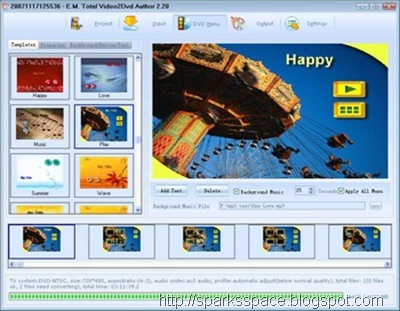
Total Video2DVD Author Features:
- Supports most popular formats such as Youtube Flv, 3gp, h264, Xvid, MOV, VOB, Mpeg, Mpeg4, Mpeg TS, AVI, WMV, ASF, DV, Mkv, Nsv, Ogm and stream formats. It converts your video files into a compliant DVD and burns it on a DVD media.
- Supports lots of subtitle file formats, including .srt .sub .ssa .ass .smi .psb .tex .idx etc; Handles subtitles files (.srt . sub. dx ) with color and font selection, and supports tags (italic, bold)
- Merges up to 8 hours of material from several movies or episodes
- Creates DVD chapters automatically with DVD chapter Menu edition (background, fond, color) . The program works for NTSC and PAL video formats
- Provides high-Quality services vs fastest converting speed (typically less than 1 hour for converting 1 movie)
- Specifies the aspect ratio automatically ( picture output types: Widescreen, Fullscreen, or automatic )
- Converts all movies directly to DVD in batch
- Integrated reliable burn engine (supports all DVD formats)
- Supports photo slideshow, include more than 100 kinds of effect
Total Video2DVD Author supports the following file formats to DVDs
- Rmvb to DVD, RM to DVD
- MP4 to DVD
- 3gp to DVD, 3g2 to DVD
- DIVX to DVD
- MPEG1(.mpg, mpeg) to DVD
- MPEG2 PS (.mpg, mpeg, vob) to DVD
- HD MPEG2 TS (DVB Transport Stream) to DVD
- Asf to DVD, Wmv to DVD
- Avi to DVD, XVID Avi to DVD, Mjpeg Avi to DVD,RAW Avi to DVD
- Flv to DVD (Youtube Flv to DVD)
- Apple Quicktime mov to DVD
- FLIC format fli to DVD, flc to DVD)
- DV to DVD
- Matroska mkv to DVD
- ogm to DVD
- Technologies format 4xm to DVD
- Playstation STR to DVD
- Nullsoft Video NSV to DVD
- Used in Quake II, Id Cinematic cin to DVD
- used in Sierra Online games, sol to DVD
- Video Formats Dx9 Directshow can open
 Rapidshare | Easyshare |Mirror Link | Trial ver
Size:11.94 MB|

Ripping/Decrypting DVD's
- DVD Shrink
- DVDFab HD Decryption (Blu-Ray & HD support)
- MacTheRipper (for Macs)
- K9Copy (for Linux)
- SmartRipper
- RipIt4Me
- AnyDVD
Converting/EncodingVideo Files
- AutoGK
- Handbrake (Multi-platform)
- FairUse Light Edition
- Dr.Divx
Burning ISO, Video, VOB Files


The following links illustrates how to add multiple movies / titles to one DVD
1.How to add multiple movies / titles to one DVD using DVD Shrink
2.How to add multiple movies / titles to one DVD using DVD2One
3.Adding multiple titles/movies to 1 DVD using Nero Recode 2

Convert your DVD to DivX without limits! Easily create movies that will play on your standalone player with the DivX and XviD codecs. Use cutting edge technology with new codecs like the well-known H264, VP7, or the ffVFW codec suite. Store several movies on a single DVD. Protect your expensive DVD collection by letting the children use a backup copy while the original discs stay in a safe place.
Encode tens of episodes of your favourite shows in only a few mouse click. Let the wizard be your guide at every step of the conversion process.Encode up to two audio tracks so you can chose between original and dubbed version at playback. Preview subtitles on the preview screen during the encoding setup.
Only available in the Full Edition:
-Encode for your iPod Video!
-Encode your DVDs to watch them on your iPod Video with optimal quality !
-Encode much faster!
-Encode much faster(1) with the Dual-Core, SMP, and Hyper-Threading processors optimised build.
-Optimise your encodings with the \”quality\” mode!
-Get the best possible quality while only using exactly the needed space. The quality mode is best suited for the archiving of DVD quality movies.
-Break the 700 MB limit!
-Encode to 1400 MB (or even more) target file size for superior video and audio quality.
-Select exactly what to encode!
-Remove any unneeded or repeating credits, encode only your favorite movie parts, …
-Take advantage of the auto update feature!
-Check for new release and upgrade with one click.

 www.fullandfree.info
MagicISO is a CD/DVD image file edit tool. It can open / create / edit /extract CD/DVD image files, and convert bin to iso and back. Make image files from CD-ROM or hard disk, and handle bootable information at meanwhile.
Features:-
- Process almost all CD-ROM image file(s) including ISO and BIN.
- Ability to directly add/delete/rename/extract file(s) within image files.
- Convert image files to the standard ISO format.
- Supports ISO 9660 Level1/2/3 and Joliet extension
- Duplicate disc to ISO file from CD-ROM.
- MagicISO embed with Windows Explorer.
- You can convert almost all image file formats, including BIN, and save it as a standard ISO format file.
- Edit ISO file in many format(such as Nero burning ROM, Easy CD Creator, CDRWin, CloneCD, BlindWrite, etc).
- Select some files or directories, and then create the ISO based on these files.
- Make bootable ISO file.
- Because of its file associations, you can simply double click an ISO file in Windows Explorer to open it.
- Very easy to use interface but powerful enough for an expert.
- Backup CD to your hard disk


Platforms: Windows 2000 , Windows 2003 , Windows 9x , Windows NT , Windows Vista , Windows XP
DVDFab Platinum is all-in-one DVD copying/converting/burning software. In just one or two steps, you can copy any DVD to DVDR/PSP/iPod/etc. DVDFab Platinum is brand new, is completely rewritten, is based on more than 6 years of DVD copy software development.

Features :
A. DVD to DVD
1. 7 DVD to DVD copy modes available: Full Disc, Main Movie, Split, Customize, Clone, Merge and Write Data.
2. Full Disc: All movies, menus and trailers, is copied to a DVD with just one click.
3. Main Movie: Just copy the movie, with specific audio/subpicture.
4. Split: Copy a DVD-9 onto two DVD-5 discs with 100% quality, and preserve original menus on both discs. Ideal for episodic/season DVD movies, TV series, etc.
5. Customize: Personalize your DVDs! Want to make a DVD with only your favorite titles? How about cutting out those annoying commercials? Or selecting specific audio/subpicture? No problem! You can select just your favorite titles, specify the title playback order, with or without original menus, to create a DVD with only the stuff you want!
6. Clone: Make perfect 1:1 bit-to-bit copy of DVDs:
* Make perfect dual layer DVD copy by using the original layer break position.
* Copy data DVD disc, like PS2 DVD.
7. Merge: Combine several titles of several sources into one DVD:
* Combine two DVD-9 like "The Lord of the Rings" into one DVD-9.
* Merge season DVDs to fewer discs.
* Create your own special features collection disc.
8. Write Data: Burn existing DVD folder or ISO image file to DVD writer, or convert DVD folder to ISO image file.
9. Very fast copying speed, normally it's about 10 - 20 minutes.
10. Burn to any blank DVD Disc (DVD+R/RW, DVD-R/RW, DVD+R DL, DVD-R DL).
B. DVD to Mobile
1. 6 DVD to Mobile copy modes available: Generic, iPod, PSP, Cell Phone, PVP and PDA. More devices support can be added manually.
2. Generic: Convert DVD title to PC MPEG-4/DivX/XVID/H.264 AVI/MP4 file. It also supports all other devices which are not listed in navigation bar.
3. iPod: Convert DVD title to Apple iPod MPEG-4/H.264 MP4 file.
4. PSP: Convert DVD title to Sony PSP MPEG-4/H.264 MP4 file.
5. Convert DVD title to specific format which is supported by cell phone, PVP (Portable Video Player) and PDA (Personal Digital Assistant).
C. Benefits
1. Remove all DVD copy protections, like CSS, RC, RCE, APS, UOPs, ARccOS, RipGuard, FluxDVD, CORE X2, etc.
2. Constantly updated to support latest DVD copy protections.
3. Backup scratched/dirty disc:
* Even if some information (IFO) cannot be read, you can still copy Main Movie or Customize.
* Recovery from DVD reading (VOB) error.
4. Constantly updated to support latest DVD burners and blank DVD discs.
5. Constantly updated to support more mobile devices.
6. FREE lifetime upgrade.
7. FREE lifetime support via e-mail, worldwide.


Link1 Pass: freshdl.com Or Link2 Or Link3 Pass:www.waregamez.com
Tutorial here


