Are you looking for a good & free alternate software for Adobe Photoshop? If so you have to try The Gimp.With this tool you can touch and create images , resize , crop , modify colors , use layers, remove or alter elements in them, convert between different formats, create animated images and even edit video.

Features:
- Multiple possibilities of undo and redo .
- Opening a number " unlimited " simultaneous imaging .
- Many selection tools like rectangular , spherical , manual tie , magic wand or color.
- Paint tools such as pencil , brush , brush, airbrush , fill, textures, clone stamp , etc.
- Tools to change of scale, tilt, strain , cloned in perspective.
- Tools for text manipulation .
- Filters for handling colors and appearance of images , such as focus and blur , deletion or addition of stains , shadows, color mapping , etc.
- Menu with effects and image processing
- Enables process automation through macros.
- Over 100 plug-ins, created by users that complement the functions of GIMP.
- Supports BMP , GIF , JPG , PCX , MNG , PNG , PCX , PDF , PS , PSD , SVG , TIFF , TGA, XPMy XCF .
- Supports GNU/Linux (i386, PPC),Microsoft Windows (XP, Vista),Mac OS X,Sun OpenSolaris
FreeBSD

It is ideal for amateur photographers, web designers, and many other people who want to create and edit digital images.
Download |Open source |19.11MB |GIMP needs GTK + Runtime Environment | Tutorials
Earlier ,while uploading videos in You Tube, you had to edit it using tools like Windows Movie Maker .You Tube users can now edit their own videos online that should simplify the whole deal.
Features
- Combine multiple videos you’ve uploaded to create a new longer video
- Trim the beginning and/or ending of your videos
- Add soundtracks from our AudioSwap library of tens of thousands of songs
- Create new videos without worrying about file formats and publish them to YouTube with one click—no upload necessary
To edit a video, a user drags a thumbnail of the video they want to edit into an empty timeline. The editor is ideal for merging single, short clips into a longer video.The newly created video can be published to YouTube directly from the editing site.Online editing is depend considerably on bandwidth. A lower bandwidth would mean slower work so it would be easier to provide users with a downloadable app. Also note YouTube users can only edit videos they have uploaded themselves and not the videos of other users.
Visit :http://www.youtube.com/testtube
Avidemux is a free video editor designed for simple cutting, filtering and encoding tasks. It supports many file types, including AVI, DVD compatible MPEG files, MP4 and ASF, using a variety of codecs. Tasks can be automated using projects, job queue and powerful scripting capabilities

You can use Avidemux to cut scenes from an existing video, merge multiple clips, apply a variety of video filters ans optionally re-encode the video to a different format. Other features include a built-in bitrate calculator, automatic video settings for popular uses (iPod, DVD etc.) and several advanced video toolsMost common codecs are supported (M-JPEG, MPEG, DivX, Xvid, huffyuv, WMA, etc.)Avidemux is available for Linux, BSD, Mac OS X and Microsoft Windows under the GNU GPL license.
 SysReq:2000/XP/Vista|Freeware|21.1MB |Download
Professional photo editing is now possible online with the help of flauntR. This tool allows you to add frames, overlays and effects to enhance the photo, so go ahead and explore its
huge collection. To try your hand out on this new photo editing tool visit website www.flauntr.com. Once you sign up go right ahead and upload photos from your PC or integrate it with your Flickr, Facebook, Orkut or MySpace account to import photos. Simply drag the desired image in the workspace and start editing, the options are unlimited! Read on and find out how you can use this tool to revamp your photos with just a few clicks.

stylR
The stylR tab allows you to apply frames, overlays, filters and digital scrapbook styles. After you’ve uploaded the required photo, scroll through the frames and overlays and select the one. you like. The photo can also be embedded on the cover of popular magazines. Click on the ‘Magazine covers’ tab and select the desired cover. Next, click ‘Adjust photo to pan’, rotate or resize the photo to fit the magazine cover. And behold! you’ve turned into an instant designer.
editR
The editR tab allows you to add effects to the photos. The ‘Edit’ tab is meant to Resize, Rotate and Crop photos. The ‘Effects’ tab has many options to add effects, similar to Photoshop. To apply the effect to the photo, click on the desired effect or if you want to apply the effect to a specific area, enable ‘Choose an area to apply’ and click on the area to apply it.To modify or obtain precise effects, move the slider around. The effects available are blur, mosaic, pixelate, posterize and sketch.It’s also possible to tweak the contrast and remove the red eye effect. Use the Reset / History button to revert to the original photo or remove the effects in case you’ve used multiple effects. Go ahead, experiment, and create flawless photos.
textR
The textR tab allows you to add shapes and text to the photo like speech bubbles, icons, stickers, expressions and signs to add fun to the photos. Simply click on the shape you want to use and drag it into place correctly. To add text, in the ‘Text’ tab, type the text into the box and click ‘Add’. Select the font from the list along with the font size and color of the
text. After this drag the text to wherever you want to place it on the photo. This is a simple and easy option for creating e-cards or adding funny captions to your photos. Sohave fun and make your photos speak.
picasR
With picasR you can blend the essence of world renowned paintings on your photos. All you have to do is select your image and select the painting whoseeffect you want to mimic.
profilR
Everytime you upload your photo on a social networking profile, the photo is mysteriously cropped to show the most unflattering part of the photo. The profilR helps you sort this out with a single click.
mobilR
The mobilR is similar to profilR in functionality. It is used to create wallpapers for a specific model of mobile phones. Simply upload the image and select the mobile phone model. The
wallpaper is cropped to the phone’s screen size. Drag it to the part you want to use as your wallpaper and click ‘Apply’. Now download the wallpaper and use it.
printR
With printR you can transform your digital photos into photo prints on high quality paper in different sizes and have them delivered anywhere in the world! This is the only paid service on flauntR. The printR tab provides options to print your photos as posters and canvas or transform them into works of art with the ‘Fine Art Print’ option. It also lets you create customized greeting cards with photos and a personalized message for every occasion.

Create your own album on flauntR to store and share unlimited photos with your friends and family members. Sign up to flauntR and discover the various options available to overhaul your photos. Have fun experimenting and flauntR your photos!


mp3DirectCut is a very small program that helps you edit MPEG audio directly.You can directly cut, copy, paste or change the volume with no need to decompress your files into a pcm format. This saves encoding time and preserves the original audio quality, because absolutely nothing must be re-encoded.

Features
- Non-destructive cut, copy, paste
- Volume change, fade, normalize, pause detection
- mp3 recording with ACM or Lame encoder
- Fast mp3 visualisation and easy navigation
- Supports Layer 2 (dvd/dvb audio)
- ID3v1.1 tag editor, ID3v2 tag keeping
- Cue Sheet support
- Auto cue (track dividing by time values)
- Track splitting with filename and ID3v1.1 tag creation
- VU meter, bitrate visualisation
- High speed recorder
- Fast play
- Command line usage
![download_thumb[1]](https://blogger.googleusercontent.com/img/b/R29vZ2xl/AVvXsEhu8fpY9qglDqy7Az9dvrKZsHGXclMRSoWZZv5FiWxyAZXD04JOJg8utGPmG15ab4E1_fsXOab9PtC_bezC4oGX-vJZSGKNf89uIJfQjUGamrP_BjJM_siK84AqEmW3vTED_w1ldPDOrQuv/?imgmax=800 "download_thumb[1]") mp3DirectCut | 189 KB | Freeware | Windows XP/Vista
mp3DirectCut | 189 KB | Freeware | Windows XP/Vista
Kate Free Video cutter is a easy to use tool to extract part of the video and save it in the same video format or any other format .It cut and save a region from any video file or cut the movie file into two parts at a certain scene. Leave the scenes you need, delete the ones you don't.
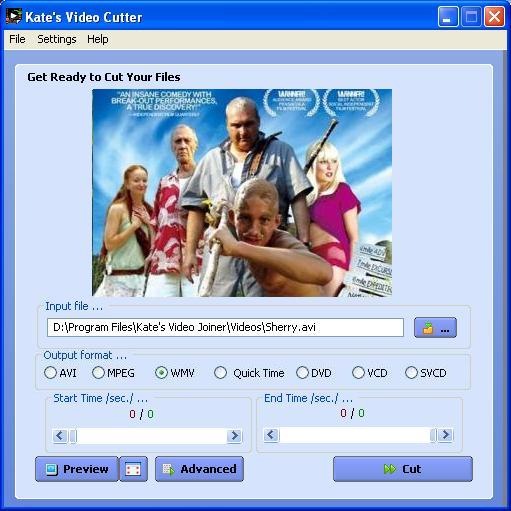
It supports AVI, WMV, MOV , DIVX, ASF, 3GP, MP4, MPEG1, MPEG2, VCD-PAL ,VCD-NTSC, SVCD-PAL, SVCD-NTSC, DVD-PAL, DVD-NTSC and other formats
 It can cut and save a region from any video file or cut the movie file into two parts at a certain scene. Leave the scenes you need, delete the ones you don`t. Advanced settings let you tweak file format, video bit rate, video frame rate, audio bit rate and audio sample rates. You can set the video size you want to record the edited piece to and specify resize type such as letter box or whatever is required.
SysReq:98/ME/2000/XP/2003|Freeware |  Kate's Video Cutter |9.59MB
Also Read
KeyNote is a Tabbed notebook with RichText editor, multi-level notes and strong encryption, built on Marek Jedlinski's KeyNote.
Keynote is a flexible, multi-featured tabbed notebook, based on Windows standard RichEdit control. It's always accessible with a single keypress, even if you work in another application. Take a look at the screenshots page.
With powerful text formatting capabilities, easily navigable interface and additional features such as styles, macros, plugins, and templates, KeyNote is has become the favorite note keeper, diary, outliner, knowledge base and information manager for thousands of users.

Examples of use:
- personal information management
- personal diary or journal
- to-do items
- scratchpad for quick notes and ideas
- writing and structuring small articles or larger documents
- Creating and storing electronic texts (easily structure chapters or sections)
- outlines, projects
- project documentation
- reports
- recipes
- personal contacts (addresses, telephone numbers)
- accounts, passwords, PIN numbers (remember to encrypt the file!)
- Internet bookmarks (clickable hyperlinks)
- all kinds of lists! If you collect books, CDs, DVDs, or just your favorite quotes or jokes, KeyNote makes it easy to store them in one place and search through them quickly.
- email archives (you can use the separate, free KNTConvert utility to import your email archives into a KeyNote file)
- archiving documents, such as articles downloaded from the Internet or local files
- templates for creating documents with a standard format
- viewing log files (use virtual nodes to view log files without having to open each file separately)
- for teachers: class notes, student attendance and assessment notes
SysReq:32-bit MS Windows (95/98/NT/2000/XP)|Freeware||6.5MB
 KeyNote | From Sourceforge.net
Do you encounter problems like when you go to Windows Explorer, Tools Menu--->Folder Options--->View Tab--->Hidden Files and Folders--->"Show hidden Files and Folders"and you would like to view hidden files and folders but after applying, it will not actually show the hidden files and folders, and even when you tried it all over, it will just come back.

It was probably some virus attack after which the Windows registry was not being updated properly.There are so many methods to restore back the registry.If one method is not working, you can try another one.
Method-1
Go to registry editor by running regedit in the run box.
Go to this key:
HKEY_CURRENT_USER\Software\Microsoft\Windows\CurrentVersion\Explorer\Advanced\Hidden
In the right hand area, double click hidden and change the value to 1.
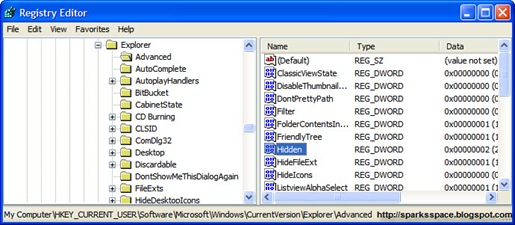
Now you’re all set to go. Check it in your tools menu if the changes have taken effect
Method-2
1. Click “Start” -> “Run…” (or press Windows key + R)
2. Type “regedit” and click “Ok”.
3.Find the key:
HKEY_LOCAL_MACHINE\SOFTWARE\Microsoft\Windows\CurrentVersion\Explorer\Advanced\Folder\Hidden\SHOWALL
4. Look at the “CheckedValue” key. This should be a DWORD key. If it isn’t, delete the key.
5. Create a new key called “CheckedValue” as a DWORD (hexadecimal) with a value of “1”.
6.Also look for key that says “DefaultValue” and change its value to “2“
7. The “Show hidden files & folders” check box should now work normally

Method-3
Download this Reg key, Unzip it > Right Click on "fix.reg" > Choose "MERGE"
Now try Unhiding your Hidden Files
Method-4
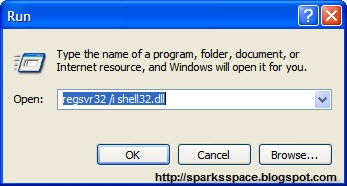
Open command prompt and execute this command---> regsvr32 /i shell32.dll.That will return the Default Local Machine entries which may have been changed back to their individual defaults so that when you select not to hide files, they are shown etc.Then you can go into folder options and reset your options.Some malware is using this ploy too, like infected flash drives. so it is recommended that every time you insert a flash disk scan it first.
Hope these tricks help you.
If you're looking for a way to sieve through an enormous image library for specific photos, this application might be just the ticket. Among Photology's powerful tools is the capability to search by color simply by using a mouse-over tool to select different gradations.

Photology will then filter all your photos for the particular shade of green you're looking for. If you want to search for a photo but can only remember the time of day it was taken, you can search by morning, noon, afternoon, and night.You can sort by date, time of day, indoor or outdoor location, and content such as faces, flowers, and sunsets. Users can also search by name for previously-labeled images.
Some editing tools are available for red-eye correction ,color correction, crop and image rotation, and you can sort photos into groups made easily accessible on the bottom of the interface.
This program’s slogan captures exactly what it’s about “No tags. No folders. It just knows”. It is designed for users who may have a huge, untagged, messy image library and need some way to quickly filter through it and find the images they are looking for.
Check here for Tutorials
 Photology
SysReq:Windows XP SP2, Vista|11.9MB|  Photology
Microsofts' Image Composite Editor is a free application for stitching several pictures together into one panoramic photograph.It is an advanced panoramic image stitcher. You shoot a set of overlapping photographs of a scene from a single location, and Image Composite Editor creates a high-resolution panorama incorporating all your images at full resolution. Then save your stitched panorama in a wide variety of formats, from common formats like JPEG and TIFF to multi-resolution tiled formats.

The program is very easy to use. The user needs to pick at least two images of the same object which are then processed automatically by the image editor.If the software program was unable to compute the new panoramic image,an error message will pop up. If the process is successful the new image will be created
You can also export the image in various formats including jpeg, tiff, Adobe Photoshop psd and the HD Photo Image format. This editor is a nice tool that can combine multiple images of the same object into one larger image of the object. This is great for objects that are to large to fit in one picture taken with the digital camera but also for detailed images that should be combined.
Features
- State-of-the-art stitching algorithms automaticaly place source images and determine panorama type
- Advanced orientation adjustment view allows planar, cylindrical, and spherical projections
- Support for different types of camera motion
- Excellent exposure blending using Microsoft Research fast Poisson algorithm
- Automatic cropping to maximum image area
- No image size limitation - stitch gigapixel panoramas
- Native support for 64-bit operating systems such as 64-bit Vista
- Output in a wide variety of image formats:
- HD View
- Silverlight Deep Zoom
- TIFF, JPEG, PNG, and more
 Microsoft Image Composite Editor Requires .NET 2.0
Foxit PDF Editor allows you to modify any page contents within any PDF document. You can select, insert, change, remove, rotate, copy and paste texts, images and graphics. You can insert, import, delete pages or design page layout. After you finish editing, you can print out the result PDF file or save it to overwrite the original file or create a new file.

Features
Modifies any contents of any PDF file Edits document intuitively, in a what-you-see-is-what-you-get way Requires no inside knowledge of PDF file format Displays PDF file fast and perfectly Presents a simple and neat user interface Packs in a small downloadable package Occupies small hard disk space after installation Supports multi-language PDF content Is affordable 
Get a 6-month license FREE : Check here
4Shared.com:Foxit.PDF.Editor.2.0.0.0_Full.rar|[CiberRed.OrgFree.Com] Foxit PDF Editor v2.0.1011.zip|Rapidshare :Foxit PDF Editor , Pass:www.thehotzone.org|Mirror Pass:for@llmyFriends
Also check:Abdio PDF Editor 7.2
CinemaForge is a download/upload utility, video converter, and video player. Supports downloading from Youtube. The player supports (FLV) and (H264) video formats like (MP4).
The converter supports Ipod (MP4), Flash (SWF), Flash (FLV), Motion Pictures Group (MPEG), Audio Video Interleaved (AVI), Window Media Video (WMV), Real Video (RM), QuickTime (MOV), MP3, Advanced Streaming Format (ASF), and JPEG (thumbnails). Easy to use Video downloading from popular video sites.
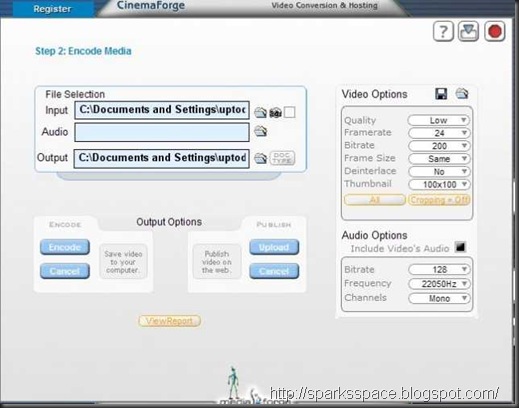
Some of the most interesting characteristics of CinemaForge are:
- Video downloading from Internet sites.
- Video converter.
- Upload and publish videos on StageGold.com
- Configuration of the desired quality for audio and video.
- Creation of image presentations with transition filters.
- Eliminating and adding audio to videos.
- Possibility of watching the report for each encoding
 Cinemaforge |9.31MB
From 4shared Cinemaforge.rar |cinemaforge.zip
Have you ever printed a webpage only to find your printout consisted mostly of empty space, ads and other junk you didn't want?
PrintWhatYouLike is a webpage editor that lets you control how web pages look when printed.The tools also lets you change the size and type of fonts used in web pages. You may expand the width of sections so that they occupy the full page and you therefore save some paper.

Features
Format any webpage for printing in seconds - no more pasting into Word Print webpages without whitespace, ads, graphics or other clutter Make printed web pages more readable by removing distractions Fix broken pages that don't print correctly Save money on paper and ink and help save the environment 
 Printwhatyoulike.com
Photobie is an Image Editing software with most features similar to Photoshop plus advanced screen capture and photo frame editing features. With photobie screen capture you can prepare presentation very simply. Photobie has simple user interface.
Furthermore, if you have MS Word and other software that create specific graphics or art fonts, then with Photobie you can simply capture it and paste it to any image. Photobie supports multiple-layer image retouching for advanced image editing.
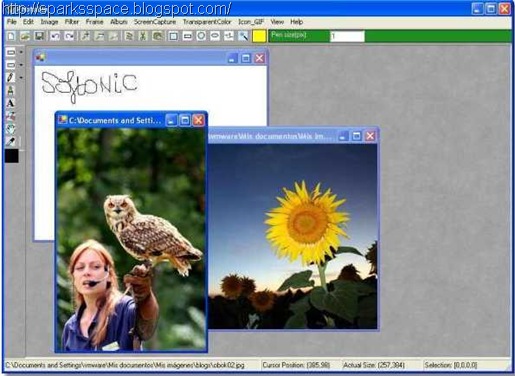
Features:
- General Photo editing tool - resize, rotate, flip, color balance adjust (includes brightness, contrast, saturation, cool-warm color, gammar, alpha); copy, cut, paste, paste as new image, crop (done by combining copy and paste as new image); selection (includes rectangle, square, oval, circle, polygon, free hand selection tool as well as Magic Wand too), you can select complex region by using selection modes such as Single, Union, Exclude, Intersect and XOR, you can also invert the selection. Much more.
- Flash Player - Fancy player allow user to play list of flash files (.swf) repeatly and selectively.
- Gif animation - create gif animation with/without transparent in a simple way.
- Image format supported:
- Bmp, Png, TIF,
- Gif --- support transparent hight quality encoding Gif.
- Ico --- can save image as true color Icon with 64x64, 48x48, 32x32, 16x16 sizes.
- Jpg --- support various encoding quality (1--100)
- Pob --- Photobie specific multi-layer image format. format used to keep the work in progress for future retouching.
- Multi-layer features - support unlimited layers; layer merge, flatten; whole layer copy, paste, clone within current image or cross images; much more.
- Painting features - draw shapes as rectangle, square, oval, circle, line, dash line, polygon, free hand, curve, it support gradient color; fill shapes as recangle, square, oval, circle, polygon, free hand, it support gradient color, much more.
- Text editing - Support most system fonts; High quality text; Gradient color support; 3D text effect;
- Screen Capture - Support Screen Capture hotkeys, you can setup up to 8 hotkeys for screen capture, you can set the hotkey to capture full screen or active window, more.
- Framing - Photobie simplifies the digital photo framing process. You can design your favorite frame template and then apply to other photos quickly.
Photobie is available in major download sites:
| Language | latest version | download now | credit |
| English | 4.8 |  | Cheng |
| English | 4.8 |  | Cheng |
| English | 4.8 |  | Cheng |
SysReq:Windows 2003, XP, 2000FreewareMicrosoft .NET Framework 3.0 or higher
Zoner Photo Studio leads you step-by-step through the process of managing and working with your digital photos: acquiring, editing, archiving, and publishing them. The all-in-one solution is exceptionally easy to use

Zoner Photo Studio supports all digital cameras, including special connection types supported by Canon.Supported also are scanners and other TWAIN devices, too. You can also use ZPS to acquire photos from web sites, via screen capture, or the Windows Clipboard.

Zoner Photo Studio supports all of the professional RAW formats, including DNG and CRW and CR2 from Canon.
Features:Check here for full details | Download Trial ( Need serial key? mail me)
Video Cutter and Splitter is a powerfull video editing program that can cut and save a region from any video file, Split the movie file into two parts at a certain scene and save them as two movies, save any frame from the movie as an image (many images formats supported). The program supports (AVI, MPEG, WMV, ASF, QT, and MOV) as input formats , And (AVI, MPEG and WMV) for output formats. This program can also convert video files from one format.
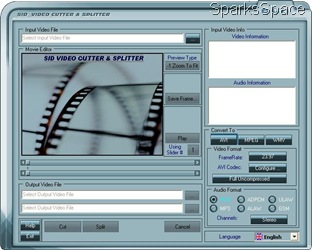
- Edit common video formats: AVI, MPEG, WMV and ASF.
- Display audio and video information.
- Zoom tool.
- Save frames from your movie to bitmap files.
- Select and cut any part of your movie.
- Split your movie at any selected point.
- Easily select regions using two movie sliders.
- Save to AVI , MPEG and WMV formats using your custom codec configuration.
- Multi-language interface.
 Video Cutter and Splitter ,
  Trail Ver
 Rapidshare
 ,Pass: mechodownload

Free Audio Editor is a multi-award winning mp3 editing software tool. The Free Audio Editor software includes a powerful audio editor feature that can edit MP3 as well as WMA, WAV, and OGG files with ease! And more, it is free!
It is a multi-functional audio editor that allows you to perform various operations with your audio files, such as filtering, adding effects. The program includes more than 20 sound effects and filters. You can record new audio from your microphone or any other input source, insert noise or silence. It displays a waveform image of the audio files and allows you to visually edit it (Cut, Copy, Delete Silence, Paste, Paste From File, Mix, Mix From File)
System Requirements:Windows 98se/Me/2000/XP/Vista/2003
Size:14.14Mb
 Download (14.14MB)Freeware

Photoshop Express is a free online photo editor that's not meant to replace Adobe's current offerings, but "make Adobe imaging technology immediately accessible to large numbers of people." And from the screenshot here you can tell it's not even a dumbed- down Photoshop, but an entirely new product.
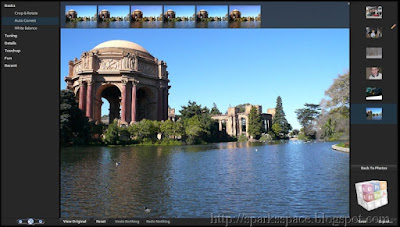
This online version is a free service. Photoshop Express allows users to store up to 2GB of images, make edits to their photos, and share them, all online. This tool may not have all the features of Photoshop, but it has basic features needed to edit photos.
Another good feature of this tool is that you can reverse the changes made to the photos just like Photoshop. You can use any of the 17 editing tools to modify your images.
Photoshop Express also includes features that let you choose how to view and share photos. You can group your photos into albums or slideshows and a gallery feature lets you gather together your Web-based albums and slideshows. You can also change layouts, add captions, and email images or albums to family or friends.
Homepage


![download_thumb[1]](https://blogger.googleusercontent.com/img/b/R29vZ2xl/AVvXsEifKtt4aExfNqaHgwtZqlEZvsXLs86H6cIDjISaK_i8FKsqEy3IUMzFJ7gHpY8jM-0wRqBlwE_cAyFVQfeF-RPtMg1WF9PfICBsJEijyni4eK7BBIDkVR8CB6RziiGemw3YQcL0LaoKTb-E/s1600-h/download_thumb%5B1%5D%5B3%5D.gif "download_thumb[1]")


