

Every time Microsoft patches Windows, the obsolete versions of earlier files and their settings are normally stored in the WinSxS folder( C:\Windows\WinSxS) . This helps if you needed to roll back a patch, Windows can pull it out from the previous version stored in the WinSxS folder. But it consumes huge amount of disk space. You can't just manually delete everything in that folder, because some files are needed if you want to roll back a Windows Update .
.

Microsoft has recently released a tool "Windows Update Cleanup" for Windows 7 that adds a new option in the Disk Cleanup tool.With this update (KB 2852386) you can free up several gigabytes of hard drive space .Once you have it installed, run Disk Cleanup and click the "Clean up system files" button to find the new Windows Update Cleanup option.After you install this update, you can use the Windows Update Cleanup option to delete Windows updates that you no longer need.

Right-click on your C: drive -> Properties-> Disk Cleanup button .Here you can see a summary of what files Windows can clean up -- temporary files, Recycle bin and log files. It is not bad , if you are able to retrieve 1GB to 3GB -- or more -- of C: drive on all of your Win7 SP1 machines .
Notes


Download the update package for x86-based versions of Windows 7
Download the update package for x64-based versions of Windows 7
When you try to format a USB drive for use this error message may appear.

HDD Low Level Format Tool is a freeware utility for low-level hard disk drive formatting and Flash Cards.This utility will erase, Low-Level Format and re-certify a SATA, IDE or SCSI hard disk drive with any size of up to 281 474 976 710 655 bytes. Will work with USB and FIREWIRE external drive enclosures. Low-level formatting of Flash Cards is supported too. Low Level Format Tool will clear partitions, MBR, and every bit of user data. Also, there are some viruses that affect the hard drive, and a a low-level format is a safe way to remove it.In low level format all files and partitions are eliminated, because that it defines or re-creates the tracks and sectors on the disk.Please note the data cannot be recovered after using this utility.So before proceeding to the format you should back-up all the files you want to keep, in order to avoid losing them.
Features

Download :HDD Low Level Format Tool ver.2.36 build 1181 |Freeware |496 Kb |Windows 2000, XP
Are you searching for a tool to manage and optimize your disk space, then you can try Disk Space Fan a free utility that will provide you the necessary options to search and remove the useless files.It helps you to free up disk space by quickly finding and deleting big, useless files and displaying them in a beautiful and animated graphics. It will provide you all the necessary information, in a pie-chart layout for better readability , and different colors are used to point out the system files , applications, mail.It is also integrated with Windows Explorer to open, delete and browse files or folders.


When the analysis is complete, it lists the files and folders that take up more space on the left side of the window. On the right is displayed the animated graphic depicting the directories and files listed.Double clicking on any of them will disclose next level of details on which particular files/folders that contribute to the memory space occupancy. Everything will be shown in colorful graphical pie chart view with all the next level details being labeled clearly even including number of files, folders and its capacity.You can navigate through directories via graph passing the mouse over a slice of the chart to view the directory that it represents and clicking on any slice of the graph you see only the graph of the selected directory.

Download :Disk Space Fan | XP/Vista/Win7 | 1.1MB
Sharing your computer with others? Worrying that other user may pry into your private files?Worrying that they may modify your system settings arbitrarily?MK Drive Access Control is a small and easy to use application that helps you lock your drives from unwanted access.It doesn’t matter whether it is a portable USB drive, Local Drive on hard disk or it is a CD / DVD drive you can lock them.This tool will lock these drives and prevent unwanted access by other users on these locked drives which you define with this software, so it prevents others to copy your private files and view them.

Features
· Lock CD/DVD drives doors to prevent write CD / DVD from your files
· Lock and Unlock all kind of drives from access and show in Windows Explorer, include Windows Drive
· Password Protecting Program Changes

Download MK Drive Access |Mirror| SysReq: Windows NT/ 2K / XP / 2003 / Vista / 2008 / 7|813 KB
You may noticed that your computer goes very slowly ,one of the reason is you may need to defragment the files in your hard drive.Data fragmentation is an invisible, but harmful, threat that erodes the performance of you PC from within.
DiskRescue is an easy-to-use and effective solution to the fragmentation of your HDD. Able to run on command, or launch defrags proactively when scheduled, DiskRescue fixes your disk fragmentation problems leaving you free to enjoy improved performance.
Features
- Powerful disk defrag engine
- Speed up and optimize
- Detailed scan results reports
- Scan and defrag scheduler
- In depth analysis
- A contemporary and intuitive interface
- Safe and trusted
- Windows Vista compatible
Here is an opportunity to obtain 1 year license key for Uniblue DiskRescue 2009
1.Visit http://mag.uniblue.com/softpedia/dr/signup/

2.Provide your details and submit
3.Check your mail box for how to register and install DiskRescue.
4.Download DiskRescue 2009 and activate with serial provided in your mail.
Xinorbis is an easy to use disk analysis tool that lets you analyze the content and distribution of space on your hard drive to the last detail, analyzing the whole unit or a single directory that you tell yourself.

It gives quick and easy to interpret results. It generates a large range of graphs and tables, allowing you to see where and how your disk space is used.Results can be saved with the Report function and compared to future scans.With this tool you can check which directories take up more MB, how space is distributed between system, software, music, graphics and more; empty file list, how many files there are of each type and more
Features
- Analyse a single drive, folder or merge several together in one report
- Vview the results by file type, attributes, size, user (owner) and date
- The Folder History feature allows you to compare the contents of a folder or drive at times and dates
- In-bullt powerful search engine (+ save results to a file or clipboard)
- Find duplicate files (by name and size)
- Complex report generation (with many user customizations) with export to HTML, ASCII, CSV or XML
- Save reports and tables for later comparison or for inclusion in other documents
- Shell support, scan a directory through Windows Explorer
SysReq:Win 9x/ME/2K/NT/XP/Vista | 4.02MB | 
Many of us don't know how much cluttered our PC's Hard Disk.System may be new one,but it doesn't take very long for the gunk to build up.Here Xinorbis can help out.Just scan your hard drive and you will get a wealth of data about what it found.You can check the size of the folders, what types of files take up the most space, the age of those files and much more
Xinorbis is a simple but powerful hard disk analyzer. Using a sophisticated mix of graphs, tables and tree displays, it gives the user a complete overview of the contents of a hard disk (or directory). It makes it easy to see the structure, contents and file distribution and file composition of a whole hard drive, folder or mapped network drive. Includes full report creation.You can analyze a single drive / directory or merge several together in one report

- Complex report generation, with export to HTML, ASCII or XML.
- Save reports and compare them to see how the contents has changed
- All information displays are completely resizable for ease of viewing
- XP style support
- Improved speed
- Shell support, scan a directory through explorer

Data fragmentation is a harmful, threat that erodes the performance of you PC . It gradually degrades the performance of your machine. It slowly leads to a significant loss of disk performance and an overall slowing of your PC’s speed.
DiskRescue comes to save your system from the harmful effects of disk fragmentation. It is the effective solution to the fragmentation of your hard disk. Able to run on command, or launch defrags proactively when scheduled, DiskRescue fixes your disk fragmentation problems leaving you free to enjoy improved performance.

DiskRescue costs $ 29.95,but here is an opportunity to grab it freely for 1 year full license .Visit here and fill the details: http://mag.uniblue.com/apcmag/au/signup/

Check your mail for license key .Download DiskRescue and activate it using the license key received.This free version of Uniblue Disk Rescue includes 12 months of active protection ( product updates and support.)
It is going to happen sooner or later;your old computer will be scraped.Obviously you want to make the data on the old hard disk unreadable before letting it into someone else’s hands.To be entirely safe, you should always wipe its hard drive clean before disposing of an old hard disk.
What many of us don’t know is that deleting or formatting a partition alone is not really sufficient to delete the data on a hard disk entirely. Play it safe with the free KillDisk program from Active@ . With this tool you can create a Boot Floppy.You can also download ISO image as an alternative ,with which you can create Boot CD.

Boot the computer with Boot Floppy/Boot CD ,when the DOS prompt appears ,type killdisk and press enter.After the DOS program starts ,by using the arrow keys,select the hard disk as well as the partition in it, which has to be deleted permanently . The {F10} key opens a dialog for selecting the deletion method.Start destroying all data with “Confirm and Wipe” and by confirming the security query.


Your computer may infected by viruses in many ways: opening suspicious e-mail,visiting doubtful websites and so on. What if you could create a folder that’s shielded from the rest of your computer? Cryptainer LE allows you to do just that.
It's powerful 128 bit encryption, creates multiple 25 MB encrypted containers (vaults) on your hard disk. These encrypted vaults can be loaded and unloaded when needed. You can view, modify and hide all types of files with a single password.It can be installed 

Features
- Creates an encrypted container (vault)
- Encrypt any type of data, even folders
- 128 bit Strong Encryption
- Easy to use, Impossible to break
- Send secure e-mails too
- Encrypt data on any Media (USB, CD etc)
- Never expires, No nag screens
- Works on all 32 bit versions of Windows
- All you need to know is to drag and drop!
SysReq:Windows 95/98/ME/2000/XP/2003 Server/Vista |3.06MB |Freeware| 
Hard drives don't last forever. In fact, they fail more often than you might think. If your hard drive has ever crashed, you know the hassle it can cause.Here are 2 utilities to diagnose your hard drive.
HDDScan is a freeware utility for storage devices diagnostics .The program can scan storage device for Bad-blocks, show S.M.A.R.T. attributes.It basically provides the user with information about the hard disks that are installed on his computer, with ways to tests those hard disks and with options to change certain settings of those hard disks.

Supported storage devices:
- ATA/SATA HDD.
- SCSI HDD.
- USB HDD (see Appendix A).
- FireWire or IEEE 1394 HDD (see Appendix A).
- RAID volumes made of ATA/SATA/SCSI HDDs (surface tests only).
- USB Flash (surface tests only).
SysReq: Windows 2K/XP/2003/Vista|1.74 MB|Freeware| Download
HD Tune is another hard Disk utility which has the following functions:
- Benchmark: measures the raw performance
- Transfer Rate
- Access Time
- CPU Usage
- Burst Rate
- Hard Disk information which includes partition information, supported features, firmware version, serial number, disk capacity, buffer size, transfer mode
- Hard Disk Health
- S.M.A.R.T. Information (Self-Monitoring Analysis and Reporting Technology)
- Power On Time
- Error scan
- Temperature display
You can use it to measures the raw performance of your drive(s), including transfer rate, burst rate, access time and more. In addition, it provides detailed information about supported hard drive features, as well as current temperature, S.M.A.R.T. Information (if available) and an error scanner.

SysReq: Windows 2000/2003/Vista/XP | Freeware |583 kb | Download
Disk Investigator helps you to discover all that is hidden on your computer hard disk. It can also help you to recover lost data

- Display the true drive contents by bypassing the operating system and directly reading the raw drive sectors.
- View and search raw directories, files, clusters, and system sectors.
- Verify the effectiveness of file and disk wiping programs.
- Undelete previously deleted files.
Sys Req: Windows All | Freeware | 347 KB

HD Tune is a hard disk benchmarking and information tool ,which has the following functions:
- Benchmark: measures the performance
- Info: shows detailed information
- Health: checks the health status by using SMART
- Error Scan: scans the surface for errors
- Temperature display

SysReq:Windows 2000, XP, XP 64-bit, 2003 Server (must be logged on as an administrator) 10 MB of free disk space- a SCSI, SATA or IDE hard disk
 HD Tune (Free Edition for Personal use)
HD TunePro:HD Tune Pro v3.10 + Crack Mirror
Here is a cool technique which hides entire hard disk drive partitions by a simple procedure without using Regedit:
- Go to Start > Run and type diskpart. A DOS window will appear with following description. DISKPART>

- Then type list volume

- Suppose you want to hide drive E:, type select volume 3. A message will now appear in the window saying “Volume 3 is the selected volume”.
- Now type remove letter E. You may have to reboot the computer.


Diskpart will remove the letter. Since Windows XP doesn’t have the capability to identify the unknown volume, it won’t display or show results from it. To access the contents of the hidden drive, repeat the process, but in the fourth step, replace remove to assign, i.e., assign letter
When you open C drive or other drives by double click it'll pop up Open With windows and ask you to choose the program to open that drive.?Or errors such as
- Access Denied
- VBScript error with error code of 800A041F
- Drive opens in new windows
Solution-I
Open control panel (classic view)/folder options. Scroll down advanced settings window and uncheck the "use simple file sharing".Apply and right click on the volumes in question, select properties and click on "security" tab.(You need to set permissions on those volumes in the administrator rights.)

There you'll see detailed sharing permissions/restrictions for all relevant accounts on that particular drive/file/folder. (Taking that you have administrative permissions) click on "Administrators ([computer name]\Administrators)" (first one from the top) and check allow on "full control" and click "apply".
If you see your account name on the list, either remove it or allow full control. If you are only user on that PC I suggest removing it from the list, for you are administrator and comply with "administrators" permissions.
After setting the permission, click on the "advanced" button. In the first tab select "Administrators ([computer name]\Administrators)" (same as before) and check the "Replace permissions entries on all child objects with entries shown here that apply to child objects" and apply

Solution-II
Normally when a virus infects a windows system which causes a drive opening problem, it automatically creates a file named autorun.inf in the root directory of each drive.
This autorun.inf file is a read only ,hidden and a system file and the folder option is also disabled by the virus. This is deliberately done by the virus in order to protect itself. autorun.inf initiates all the activities that the virus performs when you try to open any drive.
Follow the set of commands below to show and delete the autorun.inf
- Log in as Administrator or user with administrator rights.
- Turn Off system restore.
- Start-->> Right Click My Computer-->> Properties-->> System Restore Tab-->>Turn off System Restore on all drives-->> Apply-->> Ok.
- Launch Task Manager by pressing alt+ctrl+del
- click on processes tab.
- Find wscript.exe, If it is running end this process..
- End EXPLORER.EXE process from Task Manager
- Open Start>>Run and type cmd and press enter. This will open a command prompt window. On this command prompt window type the following steps.
- Type cd\
- Type attrib -r -h -s autorun.inf
-
Type del c:\autorun.* /f /s /q /a
del d:\autorun.* /f /s /q /a
del e:\autorun.* /f /s /q /a
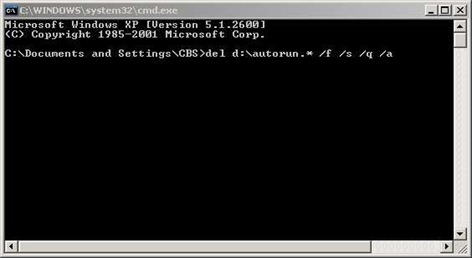
- Now type d: and press enter for d: drive partition. Now repeat steps 3 and 4. Similarly repeat step 5 for all your hard disk partition
- Start>Run>Type ’regedit”. Navigate to the following registry key:
HKEY_LOCAL_MACHINE\SOFTWARE\Microsoft\Windows NT\CurrentVersion\Winlogon
Find this key: userint.exe .make sure its value is Userinit”=”C:\WINDOWS\system32\userinit.exe,If, It is not, than changed value to this value.
- Restart your system .

Easiest way is Download Flash_Disinfector.exe file (101.6 kb)/Mirror link and run that file ...your problem solved... Your screen will go blank for a while but don't worry ..its normal

Did know that you could clone your current Hard Drive without having to by extra software? Maybe you didn't know that all that you needed, was already set up on your current system? Well, it is... and if you follow this tut, you shouldn't have much of a problem.
Make sure that you have a Master and a Slave setup on your system. The Slave drive, in this case, is where all the data on the Master is going to go to.
First: Perform a Scandisk your Master drive and follow that with a thorough Defrag. If you have an Antivirus program, do a thorough sweep with the AV first, then do the Scandisk, followed by the Defrag.
Second: Do the same thing to the target drive, as you did the Master: Scandisk then a thorough Defrag.
Third: Right-click on the Target drive and click on Format. When the box comes up, click your mouse onto the "Full" button.
Fourth: After Formatting the Target drive, run a Scandisk again and click on the button that says "Autofix Errors".
Fifth: In this final part, you might want to cut-and-paste to code in, unless you are sure that you can do it without making any mistakes:
Click on the "Start" button, then click on the "Run..." button, then place the following into the Runbox:
"XCOPY C:\*.*D:\ /c/h/e/k/r" (minus the quotes, of course) then press the "Enter" button.
If you receive an error message, then remove the space from between XCOPY and C:\
Anything that should happen to come up in the DOS box, just click "Y" for "Yes". When its all finished, pull the original Master from the system, designate the Slave as the Master (change your jumpers), then check your new Master out.
This tut has worked and has been tested on all systems except for Windows 2000.
The disappearance of SATA drives is a BIOS setting problem.It occurs if the computer uses an Advanced Host Controller Interface (AHCI) chipset; not if you've AHCI chipset that uses Parallel Advanced Technology Attachment (PATA) emulation mode. So if your BIOS allows that, your drives will immediately show up.Try the following.
Clean Install
- Turn your PC On
- As the PC starts quickly insert the Windows Vista DVD into the DVD drive
- If all goes well a black screen should appear with the legend 'Press any key to boot from CD or DVD.' If you miss this screen just reboot your machine again
- At the 'Press any key to boot from CD or DVD' screen Press Enter or any other key to start the Windows Installation
- Windows will now start loading files into memory
- After files have been loaded the screen will change to a black screen with a green progress bar. Beneath the progress bar are the Microsoft copyright details
- After a short while the language selection screen will appear. Select the desired language, and then click the Next button
- The Install screen will now appear
- On the Install screen Press the Install Now button
- At the next screen Insert your Windows Product Code number and press Enter
- Next you need to accept the EULA (End User Licence Agreement). Place a Tick in the Accept box and then Click the Next button
- At the next screen you will need to Select your Installation type. As you are performing c Clean install only the Custom option will be available for selection
- The next screen asks 'Where do you want to install Windows'
- On this screen, bottom left hand corner, you will see an option marked Load Drivers. Click on this option
- To install the device driver(s) you will need to insert the installation media that came with the RAID/SATA drives and which contains the relevant driver(s). This media can be floppy disk, CD/DVD or USB flash drive. Once you have inserted the media into the relevant drive, Click the OK button
- The system will now search the media for the relevant driver(s)
- After the search has been completed the driver(s) will appear in the 'Select the driver to be installed' Window
- Select the relevant driver and then click Next
- The driver will now be installed
- If more than one driver requires to be installed, repeat steps 17 to 19 until the necessary drivers have been installed
- After all drivers have been installed, click the Next button to continue installing Windows Vista.
Upgrade Installation
- Turn your PC On and boot to your current Windows Operating system
- Once your current operating system has booted insert the Windows Vista DVD into the DVD drive
- The DVD will spin and the Vista Installation screen will appear
- At the installation screen, press the Install Now button
- A 'Please Wait' screen will now appear
- After a few moments a screen will appear asking you to get important updates from the internet. If you are connected to the Internet, select the Yes option. If not then select No
- Next type in your Windows Product code number and Click the Next button
- The Windows EULA (End User Licence Agreement) now appears. Accept the licence agreement and Click Next
- The next window asks 'Which type of installation do you want.' Select Upgrade
- In the next window click the Load Drivers option in the bottom left corner of the window
- To install the device driver(s) you will need to insert the installation media that came with the RAID/SATA drives and which contains the relevant driver(s). This media can be floppy disk, CD/DVD or USB flash drive. Once you have inserted the media into the relevant drive, Click the OK button
- The system will now search the media for the relevant driver(s)
- After the search has been completed the driver(s) will appear in the 'Select the driver to be installed' Window
- Select the relevant driver and then click Next
- The driver will now be installed
- If more than one driver requires to be installed, repeat steps 11 to 15 until the necessary drivers have been installed
- After all drivers have been installed, click the Next button to continue installing Windows Vista.
Visit Microsoft site to procure a hot fix .

- O&O DiskRecovery
- EasyRecovery 5 Professional (gold Edition)
- EasyRecovery 6.10.07
- File Scavenger
- Recover 98 v3.1
- RecoverMyFile 2.91

Western Digital say that the VelociRaptor VR150 is the fastest SATA hard drive currently available, that it’s a whole 35% faster than the previous champion.
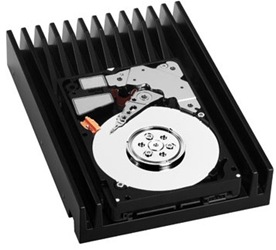
The VelociRaptor actually manages all this in 2.5 inches of space, but the device is enclosed in a 3.5 inch mounting frame that features a vital heatsink.
This 300 GB drive spins at a blazing 10,000 RPM and uses the 3 Gbps SATA interface for high-speed data transfers.
Specifications:
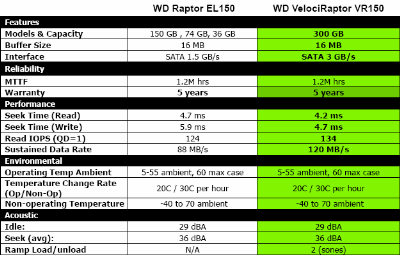
Its price is to be around Rs. 12,000 and is expected to hit the market in mid-May.

Hard Disk Sentinel is a windows application that will prevent hard disk failure.Hard Disk Sentinel (HDSentinel) is a multi-OS HDD monitoring and HDD analysis application. Its goal is to find, test, diagnose and repair hard disk drive problems, report and display HDD health, performance degradations and failures. Hard Disk Sentinel gives complete textual description, tips and displays/reports the most comprehensive information about the HDD inside the computer or in an external enclosure (USB / e-SATA). Many different alerts and report options are available to ensure maximum safety of your valuable data.

Hard Disk Sentinel monitors hard disk drive / HDD status, including health, temperature and all S.M.A.R.T. (Self-Monitoring, Analysis and Reporting Technology, built in most hard disks today) values for each hard disks. Also it measures the hard disk transfer speed in real time which can be used as a benchmark or to detect possible hard disk failures, performance degradations.
Here are some key features of “Hard Disk Sentinel”:
· Automatic analyse of hard disks
· Instant S.M.A.R.T. analysing
· Disk status in Windows Explorer
· Information on demand·
· Logging
· Alerts
· Hard Disk Details
· Hard Disk Performance
· Hard Disk Partitions
· Shutdown
· Acoustic Management
· Clock Synchronization
· Improvements

OS: Windows 95, 98, 98SE, ME, 2000, XP, 2003 or Longhorn/Vista
Home Page Size: 6.41 MB


