Google has revamped its image search feature to be faster and more effective.In the next few days changes will be rolled out .Google allow users to flip through a set of images by using their keyboard and view metadata without being redirected to a separate landing page.
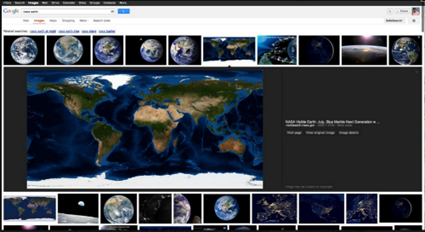
The images will be displayed in an inline panel and will be accompanied by the associated metadata and key information.If you want to go back to browsing other search results, just scroll down and pick up right where you left off.Google also added a new button to visit the page the image is hosted on. This means that there are now four clickable targets to the source page instead of just two.The revamped Google Images page will be faster and more reliable than the current version, claims the post
You may face problems due to the large file size , when you need to share your pictures on Facebook, Flickr and other online platforms or need to sent via e-mail. For such purposes, you can use FILEminimizer Pictures, which compress pictures to get the most minimum size without having to lose much quality. The compression can even up to 98%. Four different compression levels are available for different purposes .The supported image formats are JPG, BMP, GIF, TIFF, PNG and EMF. Batch compression, search wizard, handling of EXIF information, etc are some other features included.The optimized images, photos and pictures are then much smaller, ideal for sharing on social network sites.Recipients do not require the software to edit or view the optimized images and photos.
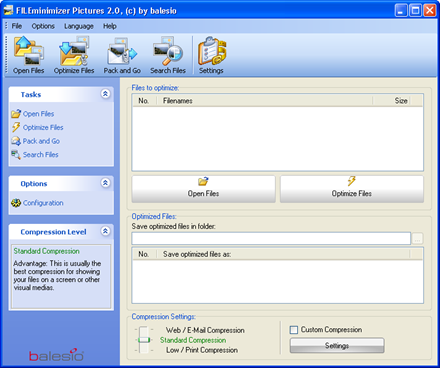
Features
- Zoom images up to 98%: Thus, a 5 MB image may be reduced to 100 KB
- Easy to use Drag and Drop: The pictures to be compressed must be placed only in the program window
- Support for JPG, BMP, GIF, TIFF, PNG and EMF images as original format
- These are NOT zip or similar compression, a compressed file with FILEminimizer Pictures must not be so extracted
- Pack and Go: optimize and send photos directly by e-mail
- Choose the best compression of three optimization levels
- Batch Compress: entire photo collection at once
- Extended setting compression quality, EXIF information, etc.
- Original images are preserved: original files are not saved over a compressed version - except when the user thus wishes
FILEminimizer is cost around € 25 ,but you can download free now as a promotional offer,for that visit this promotion page.Provide your name , email address and click the [lizenz anfordern] button

Check your mail for the license serial code and the download link of the installer .You can also download FILEminimizer
from here.
Are you looking for a good & free alternate software for Adobe Photoshop? If so you have to try The Gimp.With this tool you can touch and create images , resize , crop , modify colors , use layers, remove or alter elements in them, convert between different formats, create animated images and even edit video.

Features:
- Multiple possibilities of undo and redo .
- Opening a number " unlimited " simultaneous imaging .
- Many selection tools like rectangular , spherical , manual tie , magic wand or color.
- Paint tools such as pencil , brush , brush, airbrush , fill, textures, clone stamp , etc.
- Tools to change of scale, tilt, strain , cloned in perspective.
- Tools for text manipulation .
- Filters for handling colors and appearance of images , such as focus and blur , deletion or addition of stains , shadows, color mapping , etc.
- Menu with effects and image processing
- Enables process automation through macros.
- Over 100 plug-ins, created by users that complement the functions of GIMP.
- Supports BMP , GIF , JPG , PCX , MNG , PNG , PCX , PDF , PS , PSD , SVG , TIFF , TGA, XPMy XCF .
- Supports GNU/Linux (i386, PPC),Microsoft Windows (XP, Vista),Mac OS X,Sun OpenSolaris
FreeBSD

It is ideal for amateur photographers, web designers, and many other people who want to create and edit digital images.
Download |Open source |19.11MB |GIMP needs GTK + Runtime Environment | Tutorials
You often forward photos you have clicked to friends, or post them on the Internet. When doing so, you need to make sure that no personal information is saved within the picture files.
If you have a separate image editing program, you can determine the amount of extra information that should be saved in a JPG file. However, it is often a rather tedious job to change or delete this data. This is where the free jStrip from ‘http://davidcrowell.com/jstrip/’ comes to your aid.You can use it to quickly delete personal data from image files.
With this you make your JPEG files smaller by removing unneeded portions of the file. Because the compressed image data is not modified, there is no image quality loss. Smaller JPEG files mean less bandwidth used for webmasters, and less hard drive space required for everyone .
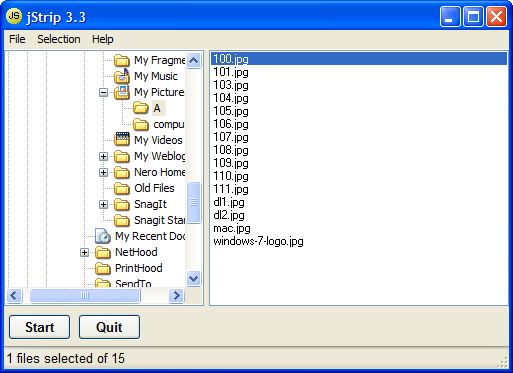
jStrip removes the following from JPEG files:
- Comments (optionally)
- EXIF Data (optionally)
- JFIF Header (optionally)
- Photoshop Image Resource Block (optionally)
- ICC color profile
- Adobe APP14 tag (optionally)
- XMP data (optionally)
- Extra bytes at end of file
- Extra bytes or header at beginning of file
- Extra bytes between JPEG blocks
- Application-specific APPx blocks
- Photoshop thumbnails
- Any other unknown blocks in the JPEG files
Make sure that you work with copies of your image files, since the tool directly overwrites them and this deletes the data permanently. You should not delete the extra information if you want to process the files further or transfer them back to the camera.
 jStrip Version 3.3 | Freeware | 1.25MB | Homepage
Most of the time, we require the Text part from images but unable to do that. Then what we do, just start typing the whole Text part by referring to the image.This process is time wasting. Now instead of writing text from images by referring image every now and then, you can use JOCR a freeware to copy text from an image file.
JOCR enables you to copy text from any files and images on the screen such as protected Web pages, PDF files, error messages.It requires Microsoft Office 2003 or higher version and you must have Microsoft Office Document Imaging (MODI) installed in order for it to work correctly.

JOCR is a standalone exe which can capture desktop, window or any region which you draw. It captures the text from the image and stores into clipboard.The text copied is plain text sans the formatting as you see, so no bolds, italics, or as it appears in a magazine. But still it will workout for many people who were looking for a free OCR software and as alternative to expensive OCR software available in the market
 JOCR
JOCR
Some other utilities
Professional photo editing is now possible online with the help of flauntR. This tool allows you to add frames, overlays and effects to enhance the photo, so go ahead and explore its
huge collection. To try your hand out on this new photo editing tool visit website www.flauntr.com. Once you sign up go right ahead and upload photos from your PC or integrate it with your Flickr, Facebook, Orkut or MySpace account to import photos. Simply drag the desired image in the workspace and start editing, the options are unlimited! Read on and find out how you can use this tool to revamp your photos with just a few clicks.

stylR
The stylR tab allows you to apply frames, overlays, filters and digital scrapbook styles. After you’ve uploaded the required photo, scroll through the frames and overlays and select the one. you like. The photo can also be embedded on the cover of popular magazines. Click on the ‘Magazine covers’ tab and select the desired cover. Next, click ‘Adjust photo to pan’, rotate or resize the photo to fit the magazine cover. And behold! you’ve turned into an instant designer.
editR
The editR tab allows you to add effects to the photos. The ‘Edit’ tab is meant to Resize, Rotate and Crop photos. The ‘Effects’ tab has many options to add effects, similar to Photoshop. To apply the effect to the photo, click on the desired effect or if you want to apply the effect to a specific area, enable ‘Choose an area to apply’ and click on the area to apply it.To modify or obtain precise effects, move the slider around. The effects available are blur, mosaic, pixelate, posterize and sketch.It’s also possible to tweak the contrast and remove the red eye effect. Use the Reset / History button to revert to the original photo or remove the effects in case you’ve used multiple effects. Go ahead, experiment, and create flawless photos.
textR
The textR tab allows you to add shapes and text to the photo like speech bubbles, icons, stickers, expressions and signs to add fun to the photos. Simply click on the shape you want to use and drag it into place correctly. To add text, in the ‘Text’ tab, type the text into the box and click ‘Add’. Select the font from the list along with the font size and color of the
text. After this drag the text to wherever you want to place it on the photo. This is a simple and easy option for creating e-cards or adding funny captions to your photos. Sohave fun and make your photos speak.
picasR
With picasR you can blend the essence of world renowned paintings on your photos. All you have to do is select your image and select the painting whoseeffect you want to mimic.
profilR
Everytime you upload your photo on a social networking profile, the photo is mysteriously cropped to show the most unflattering part of the photo. The profilR helps you sort this out with a single click.
mobilR
The mobilR is similar to profilR in functionality. It is used to create wallpapers for a specific model of mobile phones. Simply upload the image and select the mobile phone model. The
wallpaper is cropped to the phone’s screen size. Drag it to the part you want to use as your wallpaper and click ‘Apply’. Now download the wallpaper and use it.
printR
With printR you can transform your digital photos into photo prints on high quality paper in different sizes and have them delivered anywhere in the world! This is the only paid service on flauntR. The printR tab provides options to print your photos as posters and canvas or transform them into works of art with the ‘Fine Art Print’ option. It also lets you create customized greeting cards with photos and a personalized message for every occasion.

Create your own album on flauntR to store and share unlimited photos with your friends and family members. Sign up to flauntR and discover the various options available to overhaul your photos. Have fun experimenting and flauntR your photos!


Digital Cameras allow the users to snap high quality pictures,but it may not easy to upload online or share through mails .PhotoRazor solves this by making high quality copies of your photos at a smaller size - ideal for on-screen viewing. This reduces the file size making them much easier to e-mail and perfect for showing on Web sites. PhotoRazor resizes individual photos and batches of photos using a high quality bi cubic resampler, and includes an advanced black & white conversion filter with color tinting.

You can choose any photos that you would like to resize followed by the Size & Quality selection. You can also restrict the maximum Width/Height pixels so that the resized photos stay within the limit of pixel counts as well as the picture quality depending on own preference. This can also be used to resize photos in bulk to conserve time needed for other more important activities.
Features
- Very easy to use - resize whole folders of photos at the click of a button
- Ideal for creating small high quality copies of your large photos for email or showing on your website
- Real time preview - adjust the size & quality and see the result before processing, a real time saver
- Non-destructive - saves the small photos to a separate folder so your originals remain untouched
 Download |
  XP Vista 2000 98 |
 Freeware | 934 KB |
  Homepage
When you download a ISO/image file, you have to burn it to CD/DVD and you have to change the booting priority of drives through BIOS for testing it .It is more time consuming .
MobaLiveCD allows you to test your LiveCD with a single click : after downloading the ISO image file of your favorite LiveCD, you just have to start it in MobaLiveCD and here you are, without the need to burn a CD-Rom or to reboot your computer
 MobaLiveCD key features:
- No need to burn the CD-Rom anymore
- You can use the right-click menu for an easy and fast start
- Program without installation that you can start from an USB stick
- A clear and easy to use interface
- Light and portable application, packaged in a single executable of 1.44MB only

In the latest version 2.0 you can install your favorite distribution on your virtual drive and carry it and run it from your usb drive.
SysReq:Windows 2000/XP/2003 Server/Vista|Freeware| 1.44MB
 MobaLiveCD
If you're looking for a way to sieve through an enormous image library for specific photos, this application might be just the ticket. Among Photology's powerful tools is the capability to search by color simply by using a mouse-over tool to select different gradations.

Photology will then filter all your photos for the particular shade of green you're looking for. If you want to search for a photo but can only remember the time of day it was taken, you can search by morning, noon, afternoon, and night.You can sort by date, time of day, indoor or outdoor location, and content such as faces, flowers, and sunsets. Users can also search by name for previously-labeled images.
Some editing tools are available for red-eye correction ,color correction, crop and image rotation, and you can sort photos into groups made easily accessible on the bottom of the interface.
This program’s slogan captures exactly what it’s about “No tags. No folders. It just knows”. It is designed for users who may have a huge, untagged, messy image library and need some way to quickly filter through it and find the images they are looking for.
Check here for Tutorials
 Photology
SysReq:Windows XP SP2, Vista|11.9MB|  Photology
Photobie is an Image Editing software with most features similar to Photoshop plus advanced screen capture and photo frame editing features. With photobie screen capture you can prepare presentation very simply. Photobie has simple user interface.
Furthermore, if you have MS Word and other software that create specific graphics or art fonts, then with Photobie you can simply capture it and paste it to any image. Photobie supports multiple-layer image retouching for advanced image editing.
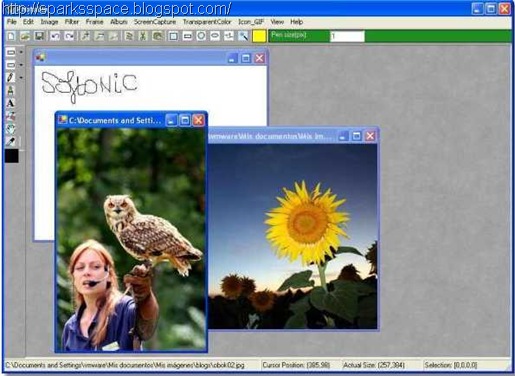
Features:
- General Photo editing tool - resize, rotate, flip, color balance adjust (includes brightness, contrast, saturation, cool-warm color, gammar, alpha); copy, cut, paste, paste as new image, crop (done by combining copy and paste as new image); selection (includes rectangle, square, oval, circle, polygon, free hand selection tool as well as Magic Wand too), you can select complex region by using selection modes such as Single, Union, Exclude, Intersect and XOR, you can also invert the selection. Much more.
- Flash Player - Fancy player allow user to play list of flash files (.swf) repeatly and selectively.
- Gif animation - create gif animation with/without transparent in a simple way.
- Image format supported:
- Bmp, Png, TIF,
- Gif --- support transparent hight quality encoding Gif.
- Ico --- can save image as true color Icon with 64x64, 48x48, 32x32, 16x16 sizes.
- Jpg --- support various encoding quality (1--100)
- Pob --- Photobie specific multi-layer image format. format used to keep the work in progress for future retouching.
- Multi-layer features - support unlimited layers; layer merge, flatten; whole layer copy, paste, clone within current image or cross images; much more.
- Painting features - draw shapes as rectangle, square, oval, circle, line, dash line, polygon, free hand, curve, it support gradient color; fill shapes as recangle, square, oval, circle, polygon, free hand, it support gradient color, much more.
- Text editing - Support most system fonts; High quality text; Gradient color support; 3D text effect;
- Screen Capture - Support Screen Capture hotkeys, you can setup up to 8 hotkeys for screen capture, you can set the hotkey to capture full screen or active window, more.
- Framing - Photobie simplifies the digital photo framing process. You can design your favorite frame template and then apply to other photos quickly.
Photobie is available in major download sites:
| Language | latest version | download now | credit |
| English | 4.8 |  | Cheng |
| English | 4.8 |  | Cheng |
| English | 4.8 |  | Cheng |
SysReq:Windows 2003, XP, 2000FreewareMicrosoft .NET Framework 3.0 or higher
You can create GIF animations from regular static images by this simple online GIF maker program.Upload the images you want to use (supports gif, png and jpg images).You can set duration for each frame and click on “Generate GIF” button.
Features
- Upload images from your PC or a web address.
- Download and save animated GIFs to your computer.
- Preview animations before downloading them.
- Specify the duration for each frame in the animation.
- Set the number of times the animation should repeat itself (infinite = 0).
- Resize frame images to largest (by width), smallest (by width) or specific size (in pixels).
- Upload and decompose existing GIF animations online.


“Make A GIF’ is another site from where you can upload the pictures you want to animate. After processing images, animated GIF created out of them, you will be provided with a download link.
Homepage
Zoner Photo Studio leads you step-by-step through the process of managing and working with your digital photos: acquiring, editing, archiving, and publishing them. The all-in-one solution is exceptionally easy to use

Zoner Photo Studio supports all digital cameras, including special connection types supported by Canon.Supported also are scanners and other TWAIN devices, too. You can also use ZPS to acquire photos from web sites, via screen capture, or the Windows Clipboard.

Zoner Photo Studio supports all of the professional RAW formats, including DNG and CRW and CR2 from Canon.
Features:Check here for full details | Download Trial ( Need serial key? mail me)

Photoshop Express is a free online photo editor that's not meant to replace Adobe's current offerings, but "make Adobe imaging technology immediately accessible to large numbers of people." And from the screenshot here you can tell it's not even a dumbed- down Photoshop, but an entirely new product.
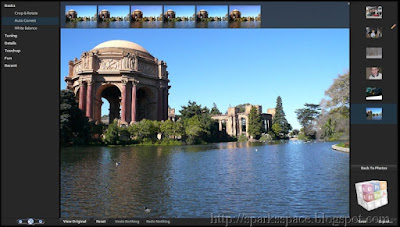
This online version is a free service. Photoshop Express allows users to store up to 2GB of images, make edits to their photos, and share them, all online. This tool may not have all the features of Photoshop, but it has basic features needed to edit photos.
Another good feature of this tool is that you can reverse the changes made to the photos just like Photoshop. You can use any of the 17 editing tools to modify your images.
Photoshop Express also includes features that let you choose how to view and share photos. You can group your photos into albums or slideshows and a gallery feature lets you gather together your Web-based albums and slideshows. You can also change layouts, add captions, and email images or albums to family or friends.
Homepage


Vector illustration, layout, bitmap creation, image-editing, painting and animation software all in one package
Transform ideas into professional and impressive results using CorelDRAW Graphics Suite X3!
With this comprehensive graphics suite, you can confidently tackle a wide variety of projects - from logo creation and Web graphics, to multi-page marketing brochures, or eye-catching signs.
From new bitmap-to-vector tracing in Corel PowerTRACE, new photo-editing features in PHOTO-PAINT, new suite-wide learning tools, and enhancements in illustration and page layout, this suite combines design capabilities, ease-of-use, and affordability that cannot be matched by any other graphics software.
Requirements: · 512 MB of RAM, 430 MB of hard disk space
· Pentium III, 800MHz processor or AMD Athlon XP
· 1,024 × 768 or better monitor resolution
· DVD drive
· Mouse or tablet
 Part1 Part2 Part3 Part4 Pass:freshdl.net Or
C.G.S.X4.14.0.0.567-NoPE.part1
C.G.S.X4.14.0.0.567-NoPE.part2
C.G.S.X4.14.0.0.567-NoPE.part3
C.G.S.X4.14.0.0.567-NoPE.part4
What is an ISO image?
An ISO image is simply a CD-ROM image saved in ISO-9660 format.ISO 9660 is an international standard originally devised for storing data on CD-ROM. ISO images are mainly used as source files from which to create CDs.The term ISO image is also used informally to refer to any optical disk image
What is BIN/.CUE?
The .BIN/.CUE image file format was developed by Jeff Arnold for the CDRWin program. The .BIN file contains an exact copy of all data stored on an optical disk in raw, unprocessed form but without subchannel data.The file contains all data stored on the original disk - not only its files and folders, but also system-specific information such as boot loaders, volume attributes, error correction codes and other metadata on the disk itself. The .CUE file is a "cue sheet" that describes the data stored in the .BIN file. The .CUE file is a plain text file. A typical .CUE file is as follows
| FILE "IMAGE.BIN" BINARY TRACK 01 MODE1/2352 INDEX 01 00:00:00 |
The file would be saved as IMAGE.CUE to match the file name prefix of IMAGE.BIN.
- You can burn them to a CD-R or a CD-RW with:
Alcohol 120% - excellent software, easy and yet very advanced (burns ISO, BIN/CUE, CCD, CDI, BWT files. - Blindwrite - easy to use.
- FireBurner - also very good, a single .EXE file.
- BurnAtOnce - A handy and FREE tool for burning .bin/.cue/.iso. Easy to use.
- Nero - many of you have this, but it can't handle all image files.
- CDRWin - This is the original BIN/CUE software.
You can also mount image files as virtual CD-ROM drives using
Alcohol Or Daemon Tools
There are also several softwares you can use to exploit & manipulate BIN/CUE files in various ways:
CDMage - http://www.geocities.com/cdmage/ & IsoBuster
.BIN file is with you but no .CUE file
.CUE can be made with just Notepad. A typical Playstation (One or 2) .CUE file looks like this:
FILE "image-name.BIN" BINARY
TRACK 1 MODE2/2352
INDEX 1 00:00:00
A typical PC CD-ROM .CUE looks like this:
FILE "image-name.BIN" BINARY
TRACK 01 MODE1/2352
INDEX 01 00:00:00
"image-name.BIN" being the name of the image file (IWDII.BIN, CIV3.BIN and so on...)
To make .BIN/.CUE files
Blindwrite suite and CloneCD perform a lot better in this purpose and can also handle various copy protections. Both of these softwares can also create .CUE files for increased compatibility


