

Here is an user-friendly Twitter client that lets you track your tweets simply and securely – Twee.li It is a freeware tool based Adobe AIR that allows you to chat with your Twitter friends. With this tool, you can talk to who you read, see their latest tweets and DMs.

You can view your online friends and also you can search contacts. Online friends are shown only if your friends are also using Twee.li
Visit:http://www.twee.li/
Finally, here is an IM that works for all networks and can login Yahoo, MSN, AIM, ICQ, GTALK you can also send photo and make free call and SMS.
Features
- Free to download
- No Internet Browsing for SMART subscribers
- Unlimited chatting even without a Computer
- So easy & simple to use
- Always online, anytime and anywhere
- Share Media: Send & receive picture messages from your phone!
- Messaging mobility and flexibility
Uzzap helps you stay connected 24/7 through your mobile phone, you can chat & meet new people & grow your social network all in your mobile phone.It uses your data or GPRS connection through your mobile phone to go online.

Once logged on, you can start enjoying UZZAP features and services, such as:
- Extended Messaging (EM): send messages to your UZZAP buddies.
- Group Chat: enjoy chatting with your UZZAP buddies in private in your own room.
- Instant Messaging (IM): connect to you YM or MSN account and see all your buddies.
- Chatrooms: Enjoy chatting & meeting new people, grow your social network with over a 1000+ UZZAP chatrooms!
- User Generated Chatrooms (UGC): Create your own chatroom.
- Share Media: Send & receive picture messages from your phone.
- Increase your UZZAP buddy list by adding them through your phonebook, user-id, or mobile number.
- Buddy Matching: UZZAP automatically adds your contacts on your phonebook who are already UZZAP users to your buddy list.
- Themes: Enjoy various themes on your phones & personalize your UZZAP.
TEXT UZZAP TO 7272 or go to Download | http://www.uzzap.com/#
Supported Phones
Nokia S60, 2nd Edition: 3230, 6030, 6070, 6101, 6600, 6630, 6670, 6680, 7610, N70, N72, E61, E70, E90, 6110 Navigator
Nokia S60, 3rd Edition: 3250, 6110, E50, E60, E65, N71, N73, N75, N76, N77, N80, N92, N93, N95
Nokia S40: 5300, 6126, 6131, 6133, 6233, 6234, 6260, 6270, 6275, 6280, 6282, 6288, 6290, 6300, 7373, 7390
Sony Ericsson K700i, W880i, P1| BenQ M65 | Motorola: MOTORAZR Maxx V6, V9 | Samsung D828+, D908i, X160, X160L |LG KU250
ooVoo helps you connect with your friends, family, and business associates like you've never done before with high-quality video and sound.A serious competitor of Skype.It can record video chats to AVI, FLV or HTML .You can also insert an animated conversation during the video blocks of changing our appearance.You can participate in a video conversation one-on-one or with up to 6 participants using a standard computer (Pentium 4 1 GHz or higher) with just a web camera and headset (or microphone and speakers).

Features

The free version supports voice and video calls with other ooVoo users - and you can have two or three talking heads participating in a given call. ooVoo also lets you record video messages, create a video chatroom, and whisk files off to various recipients, which is really cool and lends itself to many possibilities for archived interviews, panel discussions and talk..The free version of ooVoo comes at a price of another kind: incessant ads.

Getting started with ooVoo is quite easy; visit their website, download their modest client (~17MB download) and run the installer. http://www.oovoo.com/Home.aspx
ooVoo is more than video conferencing. It's a complete solution for team members to stay connected throughout the entire workday. Text chat, desktop sharing, and other tools create a virtual office .So it is a simple, effective and practical to have conversations or face-to-face video conferencing with your friends, acquaintances and family, wherever they are.
The final version of Yahoo Yahoo Messenger 10 is now available for you .It has updated to Yahoo Messenger 10.0.0.1241.So no more beta!.This updated version includes several bug fixes to enhances the stability and performance.Features include voice chat, file transfer, mail and stock quote alerts, sports scores, Photo Sharing ,news, and much more.

Yahoo! offers PC-PC, PC-Phone and Phone-to-PC service, file transfers, webcam hosting, text messaging service, and chat rooms in various categories.
Download :Yahoo Messenger v10.0.0.1241| Download standalone installer of Yahoo Messenger here (US English) | YM 10 India | OS:Windows 2000 / XP / 2003 / Vista / Windows7 / XP64 / Vista64 / Windows7 64bit
Many of us are using GoogleTalk . While you are working on some important thing in office and if you are online, the incoming messages from your friends may cause disturbance . Here is a small tool called Gtalk Autoreply which is helpful in this situation . This will also helpful when you are away from your PC .This free tool allows you to set a custom reply message which will be replied to all incoming chat messages.You will need to enter the username and password for your GMail account.

Download Gtalk Autoreply | 960 KB |Windows XP / Vista
Bored of using the same emoticons on Messenger?Try IMBooster.IMBooster is a FREE addon for Messenger to create and send your own multimedia messages to your buddies.


Get Tons of FREE and EXCLUSIVE Emoticons designed for your Messenger!
For the first time send your buddies HUGE Emoticons! (5 times bigger than normal one )
Thanks to IMBooster, send exclusive video winks and create yours from your webcam!


Palringo is one of the most flexible and feature-rich Instant Messaging Software.It allows you to instantly exchange text, photos and vocal IMs with an individual contact or even a group.Multiple platform support enables you to stay in touch with your contacts whether you are working at your PC or on the go with your mobile phone.

With Palringo, you can keep in touch with friends on popular instant messaging services such as ICQ, MSN, Gadu-Gadu, AIM, and Google Talk.


Digsby is a multiprotocol IM client, email notification tool, and social networking tool that lets you chat with all your friends on AIM, MSN, Yahoo, ICQ, Google Talk, and Jabber with one simple to manage buddy list, lets you read and delete email easily, and keeps you up-to-date of your social networking accounts.

Features:
- Multi-IM support - AIM, MSN (or Windows Live Messenger), Yahoo, ICQ, Google Talk, and Jabber Accounts
- Email - Hotmail, Gmail, Yahoo Mail, AOL/AIM Mail, IMAP, and POP accounts
- Social networks - Twitter, Facebook and Myspace
- Audio/Video Chat - from TokBox
- File transfer manager
- Spell checker
- Widget support - Digsby on your site
So what’s Digsby’s advantages over others?
- Tabbed IM windows - big help for multiple conversations at any one time
- Send emails via the IM/conversation window.
- Checks and previews your email inbox - just like the netvibes but works flawlessly
- Non-obstrusive but visible notifications
- Support for custom skins
- Design is simple and effective
- Integration with your Media Player for a Now Playing status
Download Freeware 18 MB Homepage
Need a Widget like this one?

Download Widget from here
Nimbuzz offers an all-in-one solution for mobile phones, PCs and on the web for calling, conference calling, instant messaging, group chats, chat rooms, and photo and file sharing across multiple IM communities.

It integrates all of your IM protocols in one place, for free. You’ve got support for AIM, MSN, Yahoo!, Gtalk, Jabber, and ICQ. Skype is also there, for chat and voice calls, though, like the Skype beta client, voice calls get routed over the cellular network, not as true VOIP calls.The new service also has a “Buzz” feature that lets an offline contact know you’re trying to get in touch.


The Nimbuzz software and the Nimbuzz IM and Text Message Service are completely free. PC calls from Nimbuzz are also free. Mobile calls from Nimbuzz, however, are charged at local fixed line calling rates (or deducted as part of your monthly local minutes package). This will change soon, when we release our Mobile VOIP solution – and all calls will also be free.
Here is a freeware which will give you smileys or free animated emoticons for those who are using Yahoo or MSN Messenger

The software adds a bar above the text area in your instant messenger and you can choose between different animated emoticons in different categories.Since the smileys are located on Bandoo’s server, there’s a little delay when opening menus and choosing the emoticon you want. Still, if you’ve been looking for free animated emoticons, Bandoo doesn’t disappoint

Y! Multi Messenger allows you to run multiple instances of Yahoo! Messenger instead of only keeping one open. Perfect for those who use several Yahoo ID's. With this you can login to as many Yahoo ID's that you have.You only need to double click the icon Y! Multi Messenger per each instance you need to open.
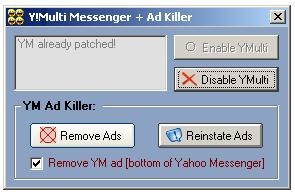
Now, you may start as many sessions as you want from the same PC with Y! Multi Messenger and enjoy this fabulous instant messaging client.Currently do not have a compatible version of YMulti Messenger for the newest Yahoo Messenger for Windows Vista.

Sys Req:Windows 95/98/Me/NT/2000/XP/2003 Server/Vista | Freeware | 52.00Kb
Messenger Plus! Live is an add-on for Windows Live Messenger that adds tons of features and extras to the software. Plus! now lets you search straight from the Log Viewer, indexing all your conversations automatically
- Search from your log viewer integrating all conversations
- Change the look and feel of Messenger with skins
- Tabbed chats similar to tabbed browsing
- Messenger Plus! gives you the possibility to choose any color you want for your messages’ text and background.
- Custom sounds for notifications
- Lock your messenger for security/privacy

OS requirements for Messenger Plus!: OS: WinXP/2003/Vista
Minimum requirements:Windows Live Messenger
Pidgin is a multi-protocol instant messaging client for BSD and Windows that is compatible with AIM, ICQ, MSN Messenger, Yahoo, IRC, Jabber and more. Users can log in to multiple accounts on multiple IM networks simultaneously.

Pidgin can work with:
- AIM
- Bonjour
- Gadu-Gadu
- Google Talk
- Groupwise
- ICQ IRC
- MSN
- MySpaceIM
- SILC
- SIMPLE
- Sametime
- XMPP
- Yahoo!
- Zephyr
 Download |Details | Freeware |10.8 Mb |OS: Windows 98/Me/NT/2000/XP
Microsoft has announce the official release of Messenger TV to 21 countries including India.With Messenger TV, two most popular activities are brought together – watching videos and chatting on IM.
This new service lets you watch MSN Videos with a friend as you have live text conversations about the videos you are watching together. Similar to watching television with your friends, you can watch videos and chat about them as you both see the same video at the same time

With Messenger TV, you can also:
1. Blog about the videos you see and like by clicking the “Blog to Spaces” button. Clicking this opens your browser with your Windows Live Spaces blog already written, complete with a thumbnail of the video and a link to watch it so all you have to do is click “publish” from within Spaces to share the video with your friends and family who visit your Spaces site.
2. Send e-mail to offline friends with links to the videos you see and like by clicking the “Email Video” button. Clicking this creates a new e-mail in your default e-mail client, such as Windows Live Mail, with a link to the video so all you have to do is click “send” to share the video with your friends and family.
3. Search for other videos to watch online by entering a word or two in the “Search for videos online” box. The search results open in your browser with search results displayed on http://video.msn.com where you can continue watching videos that are found as a result of your search.


Soashable is an Open Source (on SourceForge) web-based, multi-protocol instant messaging client written in pure Javascript.

Besides the hosted Web app that supports three major IM clients, you can take Soashable and integrate it into your personal site by installing it on your server. The chat windows are currently full of all sorts of debugging gobbledy-goop, but I successfully had conversations with people on AIM and Yahoo without a hitch.
Download from Sourceforge.net
Source:Mashable!

IM-History Client Suite is installed on your system and is running in your tray bar. It saves all your messages and contacts on IM-History servers over a secured channel. Just install IM-History Client Suite on these computers. Your data is saved over a 128-SSL secure encrypted channel and protected on servers. This means better security, than most instant messengers provide. We value your privacy and will not sell or rent your data to anyone. Currently the service is in beta stage. In the release version we plan to show unobtrusive ads for free accounts and provide pro accounts with some nice features and no ads.
- save your existing history in a reliable storage and don´t worry about it anymore;
- synchronize your char history from different computers instantly;
- merge your chat history and contacts from different messengers;
- access your chat history from anywhere;
- use convenient tools designed especially for searching and organizing your chat history and contacts.
Following messengers are supported:


Skype Yahoo! ICQ Windows Live Miranda


QIP 2005 Trillian Pidgin AIM
Recently, GoogleTalk opened up their chat protocol to Jabber networks, which now makes it possible for GoogleTalk users to chat with their buddies on AIM, MSN, Yahoo and ICQ. Here is how it can be achieved.
The resources required for this are Psi— a free Jabber client, which can be downloaded from http://psi-im.org, and GoogleTalk, which can be downloaded from http://talk.google.com. Install these two chat clients and proceed to the next step.
Select Account Setup in Psi
Launch Psi and in the “Add Account” window (which will launch if you are using Psi for the first time), enter Google Talk as the Name and do not check the box next to Register new account.
Add your Google Talk account
Click Add. Alternatively if you have already been using Psi, you can right-click on the Psi icon in the System Tray, go to Psi and select Account Setup. The Account Properties window will show up and here you should enter your full Gmail address including “@gmail.com” into the Jabber ID field. Tick the “Automatically connect on Startup” and “Automatically reconnect if disconnected” boxes.
Google Talk Account setup properties
Click on the Connection tab. Check Use SSL encryption (to server). The Port field will automatically change to 5223, which is normal. Check the “Ignore SSL warnings”, “Allow Plaintext Login”, “Send Keep-alive packets (for NAT timeouts)” and “Manually Specify Server Host/Port:” boxes. Enter “talk.google.com” in the Host field and leave the port as 5223. If you have trouble connecting, use port 443 instead.
Connection properties
To get online, just right-click on your account name in the main window, go to Status > Online. Now rightclick on the account name again and click Service Discovery.
You now need to find a Jabber transport server that will help communicate between GoogleTalk and non-GoogleTalk chat applications. A good place to start this search is The XMPP Federation at https://www.xmpp.net/ servers and Open Jabber Servers at http://www.jabber.org/user/publicservers. shtml. We used the server jwchat.org (or you can use talkonaut.com), since it had transport servers for AIM, ICQ, Yahoo as well as MSN. Enter this name into the Address field (initially containing the name gmail.com) and click on Browse. You will see a list of transport servers being populated in the box below.
Subscribe to RemoteCalendars
To set up your IM account, right-click on one of these servers and select Register. Enter your user name and password for the service selected and click Register. Psi will ask you to confirm all of your newly transported contacts in your Google Talk account.
Register other IM services as well
After this is done, they’ll all be automatically available through your Google Talk account. You will even be able to add buddies from that service, right from your GoogleTalk client. To confirm this, open GoogleTalk and you will find all the contacts from the other service inside GoogleTalk buddies list. To add a friend from another service, just make sure that you follow the format screenname@transport_ server_name.dns_name—if the Yahoo ID of your buddy is testacc@ yahoo.com, and jwchat.org is the transport server, you should add the contact from within GoogleTalk as testacc@yahoo.jwchat.org.


