Google’s another nice initiative is here -'YouTube Box Office' for the movie buffs in India .This exclusive weblink will feature a premium block buster movie every month, although the channel will be embedded with ads. You can log on to http://www.youtube.com/BoxOffice to watch movies. The free of cost service will be kick starting with Yash Raj Films' Band Baaja Baaraat. Users will have the option to view the movie in 720p and 1080p apart from the other standard resolutions. The package also includes quizzes and contests.

The new channel will be available to all users in India and will be IP blocked for users in other countries. Users can also share this channel on Facebook, Twitter and Orkut and take part in other channel related activities such as commenting and subscribing etc. YouTube already has a movies section that houses a sizeable number of films that can be watched for free.For all categories visit here.
If you've ever wondered what might happen if you connected a watermelon to 10000 volts of power,just watch this video

Earlier ,while uploading videos in You Tube, you had to edit it using tools like Windows Movie Maker .You Tube users can now edit their own videos online that should simplify the whole deal.
Features
- Combine multiple videos you’ve uploaded to create a new longer video
- Trim the beginning and/or ending of your videos
- Add soundtracks from our AudioSwap library of tens of thousands of songs
- Create new videos without worrying about file formats and publish them to YouTube with one click—no upload necessary

To edit a video, a user drags a thumbnail of the video they want to edit into an empty timeline. The editor is ideal for merging single, short clips into a longer video.The newly created video can be published to YouTube directly from the editing site.Online editing is depend considerably on bandwidth. A lower bandwidth would mean slower work so it would be easier to provide users with a downloadable app. Also note YouTube users can only edit videos they have uploaded themselves and not the videos of other users.
Earlier we covered some tools/links to download YouTube videos.Here is an excellent tool with which you can download videos from YouTube, Google Video, Metacafe, Break.com.Down-tube allows you to safe a copy of the videos that you really like to enjoy them at any moment and place so that you won’t depend nor on logging in Internet neither on the video availability.You don't need any third-party programs or extensions in your browser.

How to Use


You need a .flv player to watch videos.There are free .flv players and free .flv converters available in net.
Visit : Down-tube.com
Tube2Tone is a new online offering converts the soundtrack of Youtube videos into ringtones for cell phones, iPhones and into MP3s.It is a simple app which is also quite useful and very easy to get to grips with. With this you will be capable of taking any video hosted on YouTube and have it processed so that it becomes a ringtone. Of seconds you can choose any videos in one area, then converted to online and the ringtone can be downloaded or sent via e-mail will - all without registration and in a few seconds.

Just search & copy the URL of the YouTube video that you want to make the ringtone of, and then play it and press the record button when you want to start it and stop it when you want to stop the conversion ,then click on Record button.Select the portion of the video and proceed by clicking the button “Create”. It offers five different formats,including MP3, AAC, and WAV, and also for the iPhone, the ringing can then be loaded directly into iTunes.You can also share the ringtone on social networks.
Visit Tube2Tone
When you click on a embedded YouTube video,it will open a new tab and send you to YouTube's page. If you want to see the videos in different window, either you need grease monkey script like Youtube Video Detacher or a free application like DetachVideo from Donationcoder or Quietube.
But now there is no need a third party software or client side browser scripts to see the video on in separate window .Now YouTube's player is smarter.When you click”Watch this video in a window” it opens a new window ,where you can watch the video without any annoying adds and related windows.


Another change is that YouTube's watch page lets you pause videos by just clicking on the player.
Also Read
YouTube is one of the famous video sharing website on which users can upload and share videos.Here are some tools that can help you make the most of YouTube.Among these are utilities that help you block ads , remove comments and download videos easily.
1.Easy YouTube Video Downloader :This fantastic tool is for Firefox users, which help 

2.High Quality Videos: The quality of videos can be vary depending upon certain factors.If your computer have good configuration and good internet speeds, then watching videos in their best possible quality is easy.YouTube HD Ultimate is a user script that can help you videos in 720p High Quality.This script automatically loads the HQ / HD version of the video on the page without refreshing the whole page, with lots of other little "goodies" for YouTube like auto-looping,downloading in multiple formats,removal of in-video ads etc.

3.Quietube:Searching for a video and loading it can be quite cumbersome on a computer with a slow internet connection .Quietube is a tool, which considerably lighten the load on your browser while viewing videos.All the unnecessary elements on the page will be removed and you will see your video on a plain white page without any other elements.

Original Page

After applying quietube java script
You can then make short URLs too, to send the quietube version to your friends.Visit http://quietube.com/
4.You Tube Prevent Auto play is a great tool for advanced users, to block Auto play of You Tube videos.This can be used with any browser that has a script editor.This is basically a user script that gets installed into your browser and affects every page that you browse .This tool available here:http://userscripts.org/scripts/show/12008
5.Keepvid.com : Users those who have slow internet speed may affected with failed downloads and connections that get timed out while the download is still on.Keepvid .com is a great site to get your YouTube videos downloaded without worrying about the bandwidth.Just copy the You Tube video link from the address bar and paste it in the textbox in http://keepvid.com .Two different download links available there, one for FLV(low quality) videos and the other is for MP4(High quality) videos.You can select the desired format to download.

6.Vixy.Net:This also another popular You Tube video downloading website .Copy and paste the link in the textbox provided .Vixy.Net (http://vixy.net/ )provides videos in more formats.You can choose the file format from the dropdown box that’s provided below the URL box.Make sure that you have an appropriate media player to play these files.

7.Tubestop : By default ,when a You Tube video loads ,it starts playing automatically.There may be number of reasons for which users may not want videos to play automatically.If you have slow connection that doesn’t stream videos smoothly ,then you can stop the Auto play ,wait for it to stream and watch it later without any lags.Firefox users can disable this Auto play feature of You Tube with the help of an add-on called Tubestop.You can also use this tool , if you want to open up multiple videos in You Tube and want to view them one at a time.

8.Speedbit:Instead of waiting for your You Tube videos to load at the snail’s pace and watching it later, because of slow connection ,you can get the videos loaded in a jiffy.SpeedBit Video Acceleration is a tool for increasing the streaming& buffering speed.This application can also streaming multiple You Tube videos at a time.The efficiency of SpeedBit also depends on your internet connection speed.

9.Sprink:Browsers are often responsible for slowing down videos and causing them to load after a long time.If you feel that your browser is the culprit,then you can always switch to Sprink.This a great tool to enjoy You Tube videos on a standalone player.A major advantage of using a standalone player is that it allows you to continue with other work while still keeping the videos in view on your desktop.
Make sure you have all the required software’s installed in order to run Sprink:
- Microsoft Windows 7 Beta (from Build 7000 – Build 7106)
- Microsoft Windows Vista SP1 or above
To watch any YouTube video on a media player like VLC or GOMPlayer, first get the URL of the YouTube video from the browser’s address bar. YouTube URLs have the following format. http://www.youtube.com/watch?v=p9R05qQuHVg Now change this URL to this: http://www.youtube.com/v/p9R05qQuHVg Notice that the “watch?” is replaced “=” with a “/”. Now just open this URL in your media player
10.YouTube Comment Snob:Comments in YouTube can sometims quite annoying .YouTube Comment Snob is a Firefox extension that filters out undesirable comments from YouTube comment threads.It doesn’t remove all the comments from the YouTube page ,filtering is based on the following criteria :more spelling mistakes than those specified (value is customisable).no capitals,all capitals ,no sentence case ,unnecessary punctuation and profanity
Read More
You tube contains every type of videos such as music videos, informative videos, serial videos, movie videos, and many other types of videos .Many people would like to convert you tube videos into MP3 format. The followings steps can help you convert you tube videos into MP3 format. This process is very easy and short.
1. Install Free YouTube to MP3 Converter 3.1.5.55
2. Use your Internet browser to select and copy YouTube link you want to download.

3. Click the Paste button and wait a few seconds while the program is detecting YouTube video
4.Extract Audio & Download

Full Guide here
http://www.dvdvideosoft.com/guides/dvd/convert-YouTube-to-MP3.htm
Freez Flv to MP3 Converter is another tool to convert Flash FLV files to MP3 files.The simple and friendly interface make the program very easy to use.It is also a freeware.
OS: Win98/WinMe/WinNT 4.x/Windows2000/WindowsXP/Windows2003/Windows Vista
When we expand the YouTube video it covers entire desktop area and all existing windows on the screen stay hidden as long as you are watching the video is this "maximized" state.


Here is a simple trick , just replace the word "watch" in the URL of any YouTube video with "watch_popup" and the video will expand to fit your browser window, not the desktop
For example original YouTube video is located at
http://www.youtube.com/watch?v=XkgMSCD-sDY
Change it to http://www.youtube.com/watch_popup?v=XkgMSCD-sDY and watch it
Thanks to Amit
Many of us are big fans of screencasts.ScreenToaster is an easy to use screencasting application that lives in your browser.ScreenToaster is a web-based screencasting utility runs directly from your browser and it works on any OS that has the Java runtime.

Features
- Live audio capture
- Embed webcam in screen capture
- Accelerated or slow-motion playback
- Pauses during recording
- Download the completed screencast
- Redesign and improved content organization
- Personal profiles
The new version of ScreenToaster has ability to record video and audio simultaneously


A schoolboy and his father have unleashed software that lets people listen to YouTube's vast collection of music videos as if it were a private collection.15-year old David Nelson and 45-year old Mark J. Nelson have co-founded Muziic, which offers the Muziic Player and Encoder that allows users to stream YouTube's music onto their computers without messing up its quality.

To use Muziic Player, simply type the name of the song or artist you wish to hear into the player's search bar. Muziic then searches and returns the most relevant results from the
SysReq: 


Youtube Music Downloader is a neat utility you can use for downloading your favorite music videos from Youtube. And that's not all. The program ca be used for converting the files into various multimedia file formats ie to MP3, AVI, WMV, MOV, MP4, 3GP formats. You can download millions of music from youtube and listen them on your iPod, MP3 Player or watch them on your PC, iPod, iPhone .


Downloading and converting media files is quite easy. You can either browse the clips using the inbuilt browser and download them directly or you can use the 'Add New Download' window. Whenever you open a clip in a web browser (IE, Firefox, Opera, etc.) and copy the video's URL, it will be automatically pasted into the program window in order to be downloaded.

With VDownloader you can download and convert videos from Youtube, Google Video, Metacafe, MySpace, DailyMotion, Yuvutu, and many other similar sites, saving them in AVI or MPG format.

It include a built-in tool for searching video files by a keyword.The program allows converting downloaded video into formats compatible with iPod, Sony PSP, mobile phones. In addition, you can choose saving into AVI with different resolution and into MPEG.
VDownloader can save videos in many formats, including AVI, MPG, iPOD, PSP, 3GP, VCD, SVCD, DVD, FLV and MP3 (audio only).It can post videos to Tuenti, Orkut and Facebook.
SysReq:Windows 95/98/Me/NT/2000/XP/2003 Server/Vista|freeware|3.46MB|Freeware

Also check YouTube Video Downloaders
TubeChop allows you to easily chop a funny or interesting section from any YouTube video and share it.What is great about TubeChop is that they host the chopped/sliced videos which allow the users to embed them everywhere.

It allow you to search directly from their site or you can also paste the original YouTube URL for faster chopping
To Chop -

NetVideoHunter is a Firefox add-on with you can download videos and music from almost all video-sharing sites like YouTube, Google Video, MySpace, Metacafe, Dailymotion, iFilm, Videoegg, Veoh, Blip.tv, You can view the videos when you click on the icon.
- Click here to Install NetVideoHunter add-on for Firefox (if not installed)!
- Go to the page where the video (or music) player is and play the video (if not started automatically)!
- If the play begins, then the NetVideoHunter captures the videolink (if it's possible), and the video counter on the lower-right corner of the Firefox window (near the NetVideoHunter icon) is incremented.
- After then, you can click on the NetVideoHunter icon, and the NetVideoHunter window opens with the list of the captured videos and music.

- In this NetVideoHunter window you can see the list of captured media files and you can Play or Download them.
- You can preview the videos with the built-in player in fullscreen, if you click on the little blue button (with a rectangle) in the lower right corner:
You can play the video while download saves the FLV to your local disk. This video can be played quickly from the queue and play/save worked without any issues.

SysReq:Windows NT/2000/XP/Vista |Freeware|Firefox

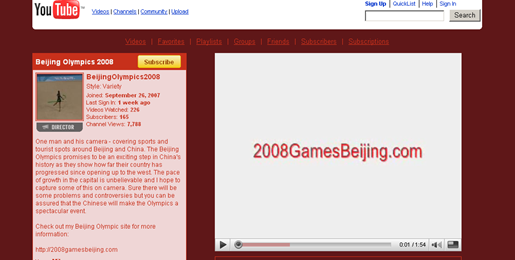
The International Olympic Committee has launched a YouTube channel to broadcast clips from the Beijing 2008 Olympic Games that will be accessible in most countries, but not in the United States.
The IOC announced Monday that a selection of clips will air in 77 countries -- in Africa, Asia, and the Middle East -- beginning Wednesday. Viewers can watch the clips on demand where digital video-on-demand rights have not been sold or acquired for exclusive airing. General Electric's NBC conglomerate has secured the broadcast rights for the Olympics in the United States.
The IOC said that its broadcasting services would regularly provide updated content, including highlights, news, and daily clips during the 17 days the games are held. The content will be geo-blocked in each territory.
Source :InformationWeek
1. Download & install Firefox (You need firefox for the extension to work)
2. Download & install the Video Downloader extension for Firefox (The video downloader extension allows you to save videos from popular websites like Myspace, YouTube, Google, and others.)
3. Download & install Media Coder (This encoder converts the video you download into .avi files which allow you to view and store them at your own discretion)
4. Find the video you wish to save. Once you are on the page click the Video Downloader Button in the bottom right part of your Firefox Browser window.
5. A window will pop-up. Click the button that says Download Link
6. When prompted select Save to Disk and then click OK
>>>Please note that if the file you download does not have the extension .flv, then rename the file and end the name with .flv <<<
7. Start up MediaCoder
8. Click on the I agree radio button and on the Skip Setup Wizard button, then close the window that appears after that.
9. Drag and drop the .flv files you downloaded into the large white area in Media Coder
10. Click on the Video tab in the lower left-hand section on the window and select XviD in the Format drop-down menu.
11. Click the large Start buttonon the top toolbar window to start transcoding your video.
12. When completed a window will propmt you saying that transcoding is completed, go your file's original location and an .AVI file shoudl be there with the same file name. Now you can play it with Windows Media or your favorite media player

Web based
1.

Videodownloadx.com doesn’t have a lot of options, but it’s simple, and it works. It also enables you to share the YouTube video with your friends via e-mail. Unfortunately, all the files are called get_video, and you have to add the .flv extension manually.
2.

KeepVid is another simple site. No hassle, works not only for YouTube movies but for a number of other sites, including Google Video, MySpace Video, DailyMotion and others. Again, you have to add the .flv extension by hand.
3.

Easy VideoDownloader is very similar to KeepVid, but supports even more video sharing sites, and it’s also available as a Firefox extension. Just like with KeepVid, all downloads are in .flv format. MediaCoder recommended for free conversion.
4.

YouTube Downloads takes the cake in the longest domain name contest. It also separates itself by using a proxy for downloading videos, which means that you might be able to get videos even if YouTube access is blocked at your workplace or in the country you live. Just search Google for YouTube videos, and copy/paste the URL into YouTube Downloads.
Downloadandsaveyoutubevideos.info
5.

Zamzar is an online file format conversion site which can do a lot more than just converting YouTube videos to another format and downloading them to your hard drive, but it’s doing a great job, so include it here. See the video of it in action here.
6. 
YouTubia separates itself from the crowd by enabling you to search as well as download YouTube files. Options are scarce, but it works.
7.

VideoDL is a quick AJAX application which allows you to download online video into your computer. It supports top 3 video sites - YouTube, Google Video, and Break.com. Simply copy the link of the page with video and paste it into the textbox.
8.

Download From Youtube!Most videos require Flv Player to play video on your PC. Blip.tv may open Windows Media Player to play video depending on extension. If you do not have an flv player then download the free FLV player now. You can search for videos on the popular media sites then download by pasting the url in the download box.
9.

Hey! Watch is an ambitious video encoding service with a large number of options, especially when it comes to converting videos to portable media player formats (it even supports my trusty iRiver H340.) Most online video converters often produce crappy results, with video and audio being out of sync, and this problem is also present on Hey! Watch, but it happens rarely.
10.

Media Converter can be a little slow, but the results of the video conversion are quite good. We’ve converted some YouTube videos to avi (mpeg4 + mp3) format and it worked well. The tool is not limited to video conversion; it also supports several audio and document formats.
11. 
KcoolOnline is a web-based converter which supports 98 video sharing web sites, including YouTube. It has literally zero options, so it’s recommended for those who like to keep it simple.
12.

TechCrunch is web based one.To download a video to your computer, enter the YouTube URL for the video in the box
Windows Applications
12. VDownloader is a desktop application that catches YouTube, Google Video, and Grinvi video links from your clipboard. Start it up, copy the video URL and click download. It automatically converts the videos to mpeg or avi formats.

13. YouTube Grabber downloads files from Youtube in .flv format. Copy and paste the URL of a video from YouTube into the program, press «grab», and the file will be downloaded into the same directory as the program.

14. Orbit Downloader is a desktop application which can download videos from a wide variety of sites. The download process is very simple, just hover your mouse over the video and you’ll get a button that says «Get It». The developers of the program claim that it’s very fast (up to 500% faster, they say) due to its P2P download technology.

15. My Video Downloader. With all these free tools, it’s actually funny to see a commercial one. It’s called My Video Downloader, and while it does look solid and offers a lot of conversion options (a free trial which enables you to download 10 videos is available).
16. KeepV is a desktop downloader as well as a converter, which can convert the downloaded videos from flv to avi, mov, mp4, or 3gp formats.

17. VideoGet boasts being able to download video clips from more than 100 video sharing websites. It’s a deskop application with a nice, simple interface, and a solid number of options.

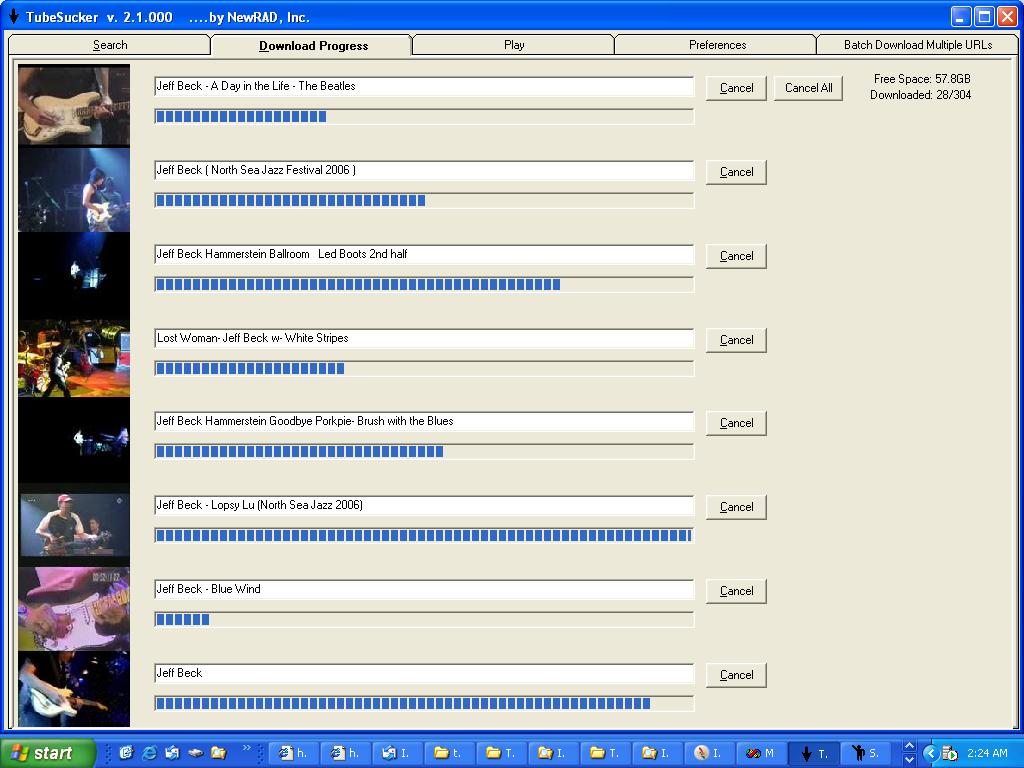
18. TubeSucker is a desktop YouTube video downloader with some interesting options, including batch downloading large amounts of videos from a certain user. See the video tour on the site.